
PDST Ellipse Locus Demonstration
Loading the math board and drawing, please wait…
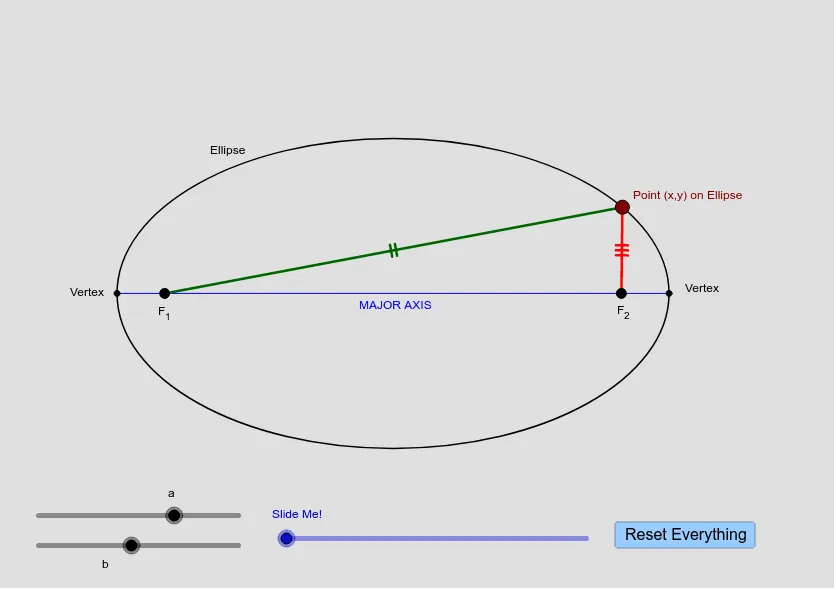
This example demonstrates the comprehensive application of ellipse properties including foci, vertices, rotation, etc. Key math concepts involved are ellipse definition, rotation, equilateral triangles, arithmetic mean, correlation coefficient, and coordinate geometry. Construction highlights include using GeoGebra commands such as Focus, Vertex, Segment, Translate, Point, Vector, Dilate, Angle, Rotate, Circle, Intersect, and Center. Suitable for high school mathematics teaching, aiding in the exploration and understanding of ellipse loci.
GeoGebra Commands & Parameters
Focus(c) → F_1, F_2Vertex(c) → C, D, E, FSegment(C, D) → dTranslate(C, (0, b + 4)) → C'Translate(D, (0, b + 4)) → D'Point(c) → GSegment(G, F_1) → eSegment(G, F_2) → fTranslate(C, (b + 4, 0)) → C'_1Vector(C, C') → uVector(D, D') → vDilate(C, If[0 < n < 1, 1 - n, 0], C') → C'_2Dilate(D, If[0 < n < 1, 1 - n, 0], D') → D'_2Segment(C'_2, D'_2) → lDilate(F_1, If[1 < n < 2, 2 - n, 1], C') → A'Vector(F_1, A') → wTranslate(G, w) → G'Segment(A', G') → mSegment(C, D) → pAngle(F_2, F_1, G) → αRotate(A', If[1 < n < 2, ((-(2 - n)) * α)], A') → A''Rotate(A', If[1 < n < 2, ((-(n - 2)) * α), 0], A'') → A''_1Rotate(A', If[1 < n < 2, ((-(n - 1)) * α), (-α)], A') → A''_2Rotate(G', If[1 < n < 2, ((-(n - 1)) * α), (-α)], A') → G''Segment(A''_2, G'') → m'Circle(C', e) → qIntersect(q, l, 1) → HSegment(C', H) → rSegment(F_1, G) → sDilate(F_2, If[2 < n < 3, 3 - n, 1], D') → B'Vector(F_2, B') → tTranslate(G, t) → G'_1Translate(G, t) → G'_2Translate(F_2, t) → B'_1Segment(G'_2, B'_1) → f'Angle(G, F_2, F_1) → βRotate(G'_2, If[2 < n < 3, ((n - 2) * β)], B') → LRotate(B'_1, If[2 < n < 3, ((n - 2) * β)], B') → MSegment(L, M) → f''Segment(H, D') → a_1Segment(G, F_2) → b_1Center(c) → ASegment(A, G) → c_1Segment(A, G) → d_1Dilate(A, If[1 < n < 2, 2 - n, 0], C') → A'_1Vector(F_1, A'_1) → u_1Translate(A, u_1) → A'_2Translate(G, u_1) → G'_3Segment(A'_2, G'_3) → e_1Angle(D, F_1, G) → γRotate(A'_2, ((-(n - 1)) * γ), A'_2) → BRotate(G'_3, ((-(n - 1)) * γ), A'_2) → ISegment(B, I) → f_1Dilate(G, If[2 < n < 3, 3 - n, 0], D') → G'_4Vector(G, G'_4) → v_1Translate(A, v_1) → A'_3Translate(G, v_1) → G'_5Segment(A'_3, G'_5) → g_1Rotate(A'_3, If[2 < n < 3, ((-(n - 2)) * γ)], G'_4) → JRotate(G'_5, If[2 < n < 3, ((-(n - 2)) * γ)], G'_4) → KSegment(J, K) → h_1
AI Drawing Prompt Reference
Draw an ellipse, marking its foci and vertices, to demonstrate rotation. Take points on the ellipse, generate new points and segments through translation and dilation, forming an equilateral triangle. Use vector rotation and scaling to create complex loci. Finally, determine key positions using circles and intersections, connecting the points with lines to fully present the geometric properties and transformation relationships of the ellipse.
The prompt above was compiled from the original drawing commands and is for reference only.