
Eigenvalues and Eigenvectors
Loading the math board and drawing, please wait…
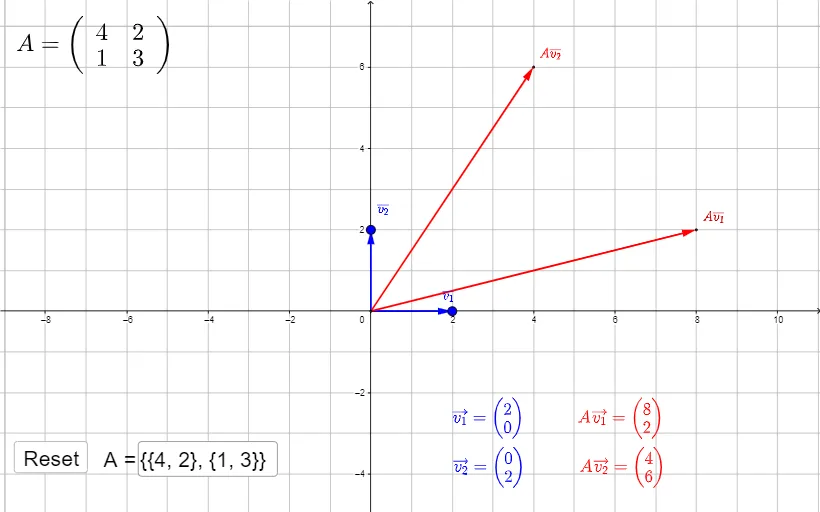
Input a 2x2 matrix to visualize its eigenvectors in the plane. Drag the blue dots to move v1 and v2. Can you identify which vectors v are eigenvectors? This example covers the core concepts of matrices, eigenvalues, and eigenvectors. It uses commands like Intersect, Vector, Identity, and Textfield in GeoGebra. Suitable for high school and above students learning matrix transformations.
GeoGebra Commands & Parameters
Intersect(yAxis, xAxis) → OVector(O, A) → aVector(O, B) → bIdentity(2) → ITextfield(M) → InputBox1
AI Drawing Prompt Reference
In a coordinate plane, draw a visualization of a 2x2 matrix showing its eigenvectors. Start by marking the origin, then draw two vectors from the origin to two draggable blue points, representing the matrix's column vectors. Include an input box for entering matrix values. As the matrix changes, display the directions of its eigenvectors in the plane—these vectors remain on their original lines after transformation, only scaling in length. Drag the blue points to adjust the vectors and observe which ones are eigenvectors, understanding how matrix transformations affect vectors.
The prompt above was compiled from the original drawing commands and is for reference only.