
Dynamic Symmetry Demonstration
Loading the math board and drawing, please wait…
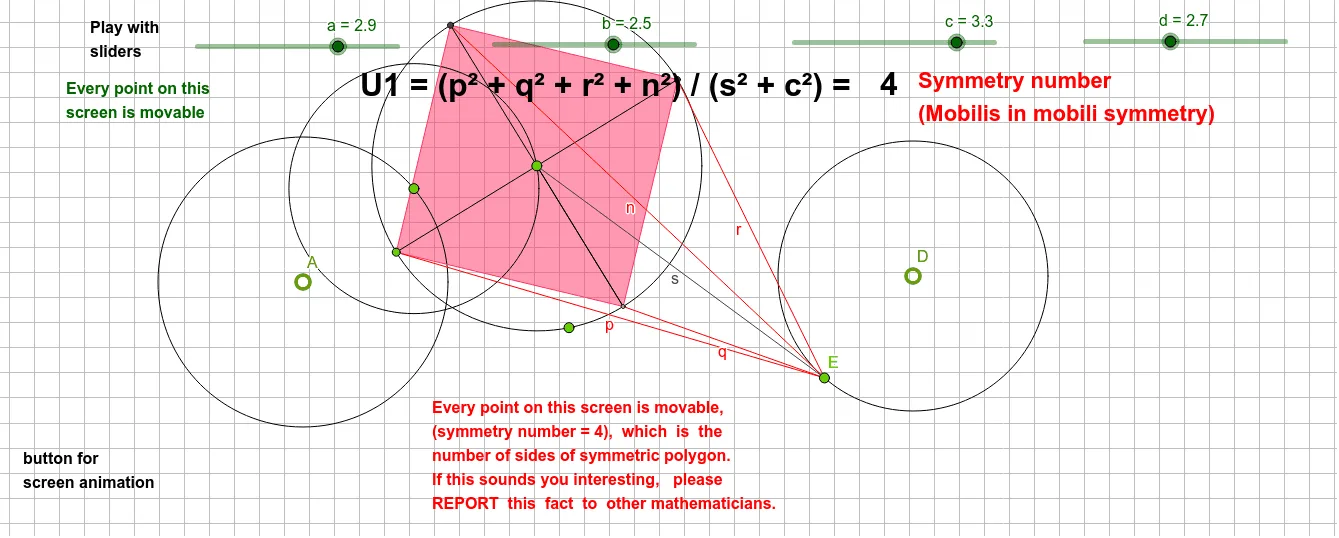
This example demonstrates symmetry in dynamic geometry involving circles and polygons; core concepts include circles, polygons, geometric transformations, and symmetry; construction highlights: using GeoGebra commands like Circle, Point, Line, Intersect, Rotate, Angle, Segment, Polygon; suitable for high school students and math enthusiasts exploring geometric transformations and symmetry principles.
GeoGebra Commands & Parameters
Circle(A, a) → ePoint(e) → BCircle(B, b) → fPoint(f) → CCircle(C, c) → gCircle(D, d) → hPoint(h) → EPoint(g) → FPoint(g) → GLine(G, C) → iIntersect(g, i, 2) → HRotate(G, 90°, C) → G'Angle(G, C, G') → αSegment(C, G') → jLine(G', C) → kIntersect(g, k, 2) → ISegment(G, H) → lSegment(G', I) → mPolygon(G, G', H, I) → q1, g_1, g', h_1, ıSegment(I, E) → nSegment(G, E) → pSegment(G', E) → qSegment(H, E) → rSegment(C, E) → s
AI Drawing Prompt Reference
Create a dynamic geometry symmetry demonstration featuring multiple circles and polygons, illustrating geometric transformations and symmetry principles. Begin by drawing a circle and marking points on it, then create new circles using these points as centers. Connect these points with line segments to form polygons. Use rotations and angle measurements to generate symmetrical shapes, and link key points with segments to form a complex geometric pattern incorporating circles, polygons, and symmetrical structures.
The prompt above was compiled from the original drawing commands and is for reference only.