
Dynamic Simulation of Vector Addition and Subtraction
Loading the math board and drawing, please wait…
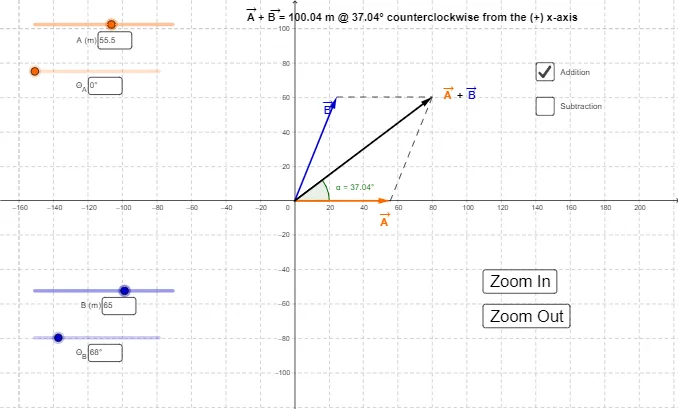
① This GeoGebra example dynamically simulates vector addition and subtraction, visually demonstrating how two vectors combine or decompose geometrically. ② Core mathematical concepts include vector addition, subtraction, parallelogram law, triangle law, vector magnitude, and direction angles. ③ Construction highlights: uses Vector command to create vectors u, v, w; Intersect to find intersection points; Angle and Segment to construct angles and sides; Textfield and InputBox for interactive input; buttons for control; objects include points A, B, C, D, E, F and parameters Θ_1, Θ_2, r_1, r_2 for parametric dynamic adjustment. ④ Suitable for high school or early college students learning vector operations, and useful for teachers in classroom demonstrations or for students' self-exploration of vector properties.
GeoGebra Commands & Parameters
Intersect(xAxis, yAxis) → CVector(C, B) → uVector(C, A) → vIf(d, Vector[u + v], Vector[v - u]) → wTextfield(Θ_1) → InputBox1Textfield(Θ_1) → InputBox2Textfield(r_1) → InputBox3Textfield(Θ_2) → InputBox4Textfield(r_2) → InputBox5Segment(A, C) → aSegment(A, D) → bSegment(B, D) → cAngle((100, 0), (0, 0), D) → αSegment(E, D) → f
AI Drawing Prompt Reference
Create a dynamic simulation showing vector addition and subtraction, visually demonstrating how two vectors combine or decompose geometrically. Include an origin and two vectors, with the parallelogram and triangle laws illustrating their sums and differences. Use sliders to dynamically adjust the lengths and direction angles of the vectors, displaying their magnitudes and angles. The diagram should feature a parallelogram and a triangle, along with interactive text boxes for inputting angles and lengths.
The prompt above was compiled from the original drawing commands and is for reference only.