
Position and Displacement Vectors Interactive Demo
Loading the math board and drawing, please wait…
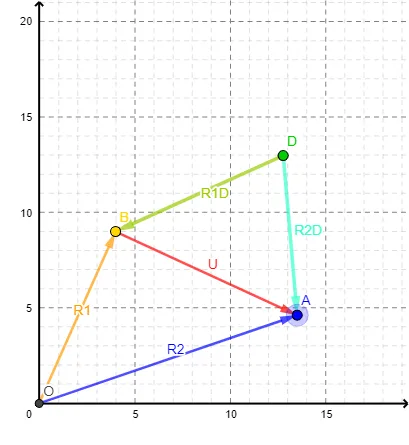
This GeoGebra example dynamically illustrates the concepts of position vectors and displacement vectors, showing the position vector from origin O to point A and the displacement vector from point A to point B. Core mathematical concepts include vector definition, vector addition (displacement equals final position vector minus initial position vector), and geometric representation of vectors in the plane. Construction uses the Intersect command to find intersection points and the Vector command to create vectors, involving objects A, O, B, D, and vectors R1, U, R1D, R2D, R2. Dragging points allows observation of vector changes. Suitable for high school or early college students learning vector basics, also useful in physics for teaching position and displacement, enhancing understanding of vector operations geometrically.
GeoGebra Commands & Parameters
Intersect(xAxis, yAxis) → OVector(O, B) → R1Vector(B, A) → UVector(D, B) → R1DVector(D, A) → R2DVector(O, A) → R2
AI Drawing Prompt Reference
Draw a coordinate plane with the x- and y-axes and a fixed origin O. Mark two movable points A and B. From O, draw the position vector pointing to B, and also draw the vector from B toward A to illustrate the displacement relationship between A and B. Add a third movable point D, and from D draw two comparison vectors pointing to B and to A. Make A, B, and D draggable while keeping the axes and origin fixed, so the vectors update as the points move.
The prompt above was compiled from the original drawing commands and is for reference only.