
Dynamic Right-Triangle Trig Ratios: Sine, Cosine & Tangent
Loading the math board and drawing, please wait…
In collections
Thinking Classroom Exploration: RT Trig (Solving for Sides)
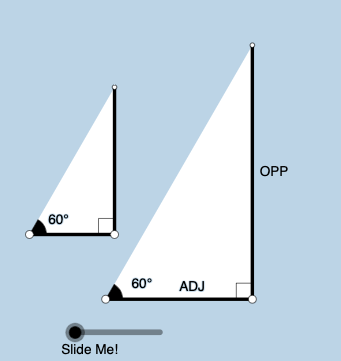
This GeoGebra example dynamically illustrates how the trigonometric ratios (sine, cosine, and tangent) of a right triangle are determined by side lengths as the triangle is rotated and the reference angle changes. It emphasizes the geometric meaning of sin/cos/tan for angles like α/β and links ratio behavior to a “median value”/distribution-style intuition for how values vary with angle. The construction uses key GeoGebra commands and objects: Point and Segment to build the triangle and its sides; OrthogonalLine to enforce the right angle; Rotate and Angle to animate the configuration and label the angle; Ray, Circle, and Intersect to create auxiliary geometry and intersection points; Polygon to form the triangle region; Midpoint for central/median-type measures; Textfield and Text (with RotateText) to display computed values and rotating annotations; plus InputBox1 for interactive control of parameters/angle. Suitable for middle-school to early high-school learners and for classroom demonstrations or self-study focused on trig ratios and dynamic geometry visualization.
GeoGebra Commands & Parameters
Point(Ray[A, A + (1, 0)]) → BSegment(A, B) → fOrthogonalLine(B, f) → gRotate(B, (a * pi / 180), A) → B'Angle(B, A, B') → αRay(A, B') → hCircle(B, 2) → cIntersect(c, g, 2) → CRay(B, C) → iIntersect(h, i) → DSegment(B, D) → jSegment(A, D) → kPolygon(A, B, D) → poly1, d, a_1, bRotate(B, If[0 < e ≤ 1, (-((e * (pi / 2 - α)))), α - pi / 2], D) → B'_1Rotate(D, If[0 < e ≤ 1, (-((e * (pi / 2 - α)))), α - pi / 2], D) → D'Segment(B'_1, D') → j'Rotate(A, If[0 < l ≤ 1, (α * l), α], A) → A'Rotate(B, If[0 < l ≤ 1, (α * l), α], A) → B'_2Segment(A', B'_2) → f'Rotate(B, If[0 < m ≤ 1, (m * pi / 2), pi / 2], B) → B'_3Rotate(D, If[0 < m ≤ 1, (m * pi / 2), pi / 2], B) → D'_1Segment(B'_3, D'_1) → j'_1Textfield(a) → InputBox1Angle(D, B, A) → βMidpoint(A, D) → ERotateText(text7, α) → text8Midpoint(A', B'_2) → FRotateText(text9, α) → text10Point(Ray[G, G + (1, 0)]) → HSegment(G, H) → tRotate(H, (a * pi / 180), G) → H'Ray(G, H') → f_1OrthogonalLine(H, t) → g_1Intersect(g_1, f_1) → IPolygon(G, H, I) → t1, i_1, g_2, h_1Angle(H, G, I) → γSegment(H, I) → j_1Rotate(H, If[0 < e ≤ 1, ((-e) * (pi / 2 - α)), (-(pi / 2 - α))], I) → H'_{1}Rotate(I, If[0 < e ≤ 1, ((-e) * (pi / 2 - α)), (-(pi / 2 - α))], I) → I'Segment(H'_{1}, I') → k_1Rotate(G, If[0 < l ≤ 1, (l * α), α], G) → G'Rotate(H, If[0 < l ≤ 1, (l * α), α], G) → H'_{2}Segment(G', H'_{2}) → t'Angle(I, H, G) → δRotate(H, If[0 < m ≤ 1, (m * pi / 2), pi / 2], H) → H'_{3}Rotate(I, If[0 < m ≤ 1, (m * pi / 2), pi / 2], H) → I'_{1}Segment(H'_{3}, I'_{1}) → l_1
AI Drawing Prompt Reference
Draw a right triangle with one fixed angle and a rotating angle to illustrate how the lengths of its sides affect the sine, cosine, and tangent ratios. Construct the right angle using auxiliary lines and a circle, and display the two non-right angles. Label the sides with their lengths and use different colors or styles. Add a slider to control the rotation angle, dynamically showing the sine, cosine, and tangent values, with text boxes displaying the calculations outside the triangle.
The prompt above was compiled from the original drawing commands and is for reference only.