
Dynamic Illustrator for Right-Triangle Trig Ratios
Loading the math board and drawing, please wait…
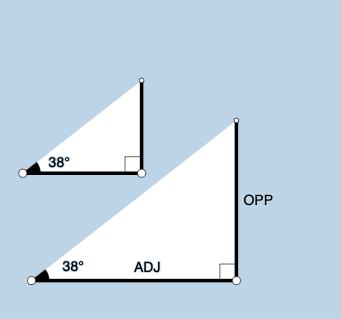
This example dynamically visualizes how the sine, cosine, and tangent ratios of a right triangle change as the defining angle varies, linking each trig ratio to corresponding side-length constructions. Key math concepts include right-triangle trigonometric ratios (sin/cos/tan), angle measurement, and geometric interpretation of ratios via length relationships. Construction highlights in GeoGebra: Point and Segment define vertices and triangle sides; OrthogonalLine establishes the right angle; Ray and Angle create and display the moving angle (e.g., α, β); Rotate drives the configuration by rotating rays/segments; Circle and Intersect determine auxiliary points from geometric intersections; Polygon outlines the triangle; Midpoint is used for representative constructions, while Textfield and RotateText add labels for angles and ratio-related quantities (text1, text2), with InputBox1 and related objects supporting parameter control and display. Suitable for high school through early college instruction, particularly for introducing trig ratios with interactive geometry and for classroom demonstrations or student exploration.
GeoGebra Commands & Parameters
Point(Ray[A, A + (1, 0)]) → BSegment(A, B) → fOrthogonalLine(B, f) → gRotate(B, (a * pi / 180), A) → B'Angle(B, A, B') → αRay(A, B') → hCircle(B, 2) → cIntersect(c, g, 2) → CRay(B, C) → iIntersect(h, i) → DSegment(B, D) → jSegment(A, D) → kPolygon(A, B, D) → poly1, d, a_1, bRotate(B, If[0 < e ≤ 1, (-((e * (pi / 2 - α)))), α - pi / 2], D) → B'_1Rotate(D, If[0 < e ≤ 1, (-((e * (pi / 2 - α)))), α - pi / 2], D) → D'Segment(B'_1, D') → j'Rotate(A, If[0 < l ≤ 1, (α * l), α], A) → A'Rotate(B, If[0 < l ≤ 1, (α * l), α], A) → B'_2Segment(A', B'_2) → f'Rotate(B, If[0 < m ≤ 1, (m * pi / 2), pi / 2], B) → B'_3Rotate(D, If[0 < m ≤ 1, (m * pi / 2), pi / 2], B) → D'_1Segment(B'_3, D'_1) → j'_1Textfield(a) → InputBox1Angle(D, B, A) → βMidpoint(A, D) → ERotateText(text7, α) → text8Midpoint(A', B'_2) → FRotateText(text9, α) → text10Point(Ray[G, G + (1, 0)]) → HSegment(G, H) → tRotate(H, (a * pi / 180), G) → H'Ray(G, H') → f_1OrthogonalLine(H, t) → g_1Intersect(g_1, f_1) → IPolygon(G, H, I) → t1, i_1, g_2, h_1Angle(H, G, I) → γSegment(H, I) → j_1Rotate(H, If[0 < e ≤ 1, ((-e) * (pi / 2 - α)), (-(pi / 2 - α))], I) → H'_{1}Rotate(I, If[0 < e ≤ 1, ((-e) * (pi / 2 - α)), (-(pi / 2 - α))], I) → I'Segment(H'_{1}, I') → k_1Rotate(G, If[0 < l ≤ 1, (l * α), α], G) → G'Rotate(H, If[0 < l ≤ 1, (l * α), α], G) → H'_{2}Segment(G', H'_{2}) → t'Angle(I, H, G) → δRotate(H, If[0 < m ≤ 1, (m * pi / 2), pi / 2], H) → H'_{3}Rotate(I, If[0 < m ≤ 1, (m * pi / 2), pi / 2], H) → I'_{1}Segment(H'_{3}, I'_{1}) → l_1
AI Drawing Prompt Reference
Draw a right triangle with the right angle at the right end of a horizontal base. The hypotenuse is formed by rotating a ray from the left endpoint of the base by an angle controlled by a slider. Choose a point on the hypotenuse and drop a perpendicular to the base, marking the foot. Highlight the segments representing sine, cosine, and tangent with distinct colors or styles, updating dynamically as the angle changes. Place a text box nearby showing the current angle and the three ratio values. Additionally, draw a congruent right triangle on the right side to illustrate the correspondence between angles and side lengths, with auxiliary rotated segments to indicate angle variation.
The prompt above was compiled from the original drawing commands and is for reference only.