
Dynamic Trigonometric Ratios in Right Triangles: Sine, Cosine, Tangent
Loading the math board and drawing, please wait…
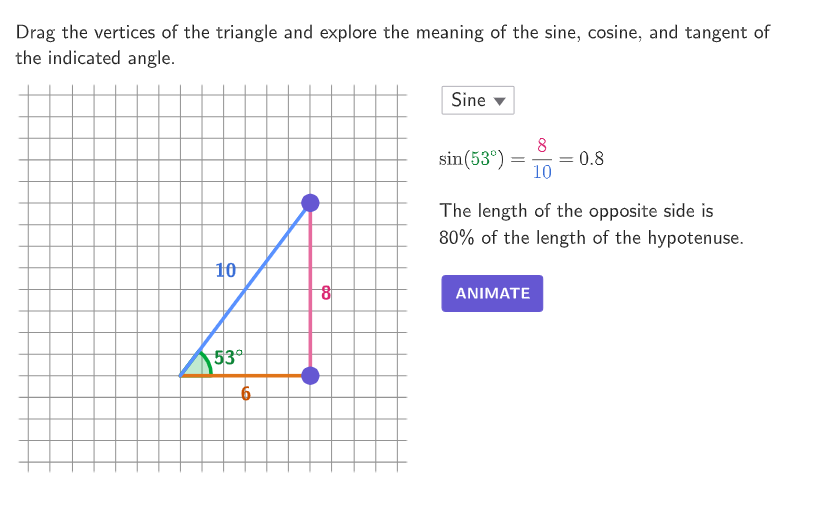
This GeoGebra example dynamically builds a right triangle to show how the sine, cosine, and tangent ratios change as the triangle’s shape and side lengths are modified. It emphasizes the geometric meaning of each ratio by relating opposite, adjacent, and hypotenuse sides to sin/cos/tan. Key concepts include right-triangle trigonometric ratios and evaluating them for specific configurations (e.g., a 3-4-5 right triangle). The construction uses Corner, Polygon, Point, Angle, Segment, and Text to create and label the triangle and its angle, while Translate and Rotate help reposition elements and keep the visualization consistent. Animation controls (btnAnimate, speed, anim, options) together with guide lines (hGuideline, vGuideline, MoveGuideLine) drive the changing geometry. It also uses indicator segments (segmentSine, segmentCosine, segmentTang) and on-screen text (textSine, textCosine, textTangent) to present and compare the ratio values during the exploration. Suitable for grades 9–12 and as a learning activity for solving number and word problems using trigonometric ratios.
GeoGebra Commands & Parameters
Corner(5) → AppSizePolygon({(-0.5, -0.5), (17.5, -0.5), (17.5, 17.5), (-0.5, 17.5)}) → q1Sequence(A + (ii, 0), ii, 3, 10) → PointsBPoint(PointsB) → BSequence(B + (0, ii), ii, 3, 10) → PointsCPoint(PointsC) → CPolygon(A, B, C) → t1, c, a, bAngle(B, A, C) → αText(round(α), A + (2.25, 1), true, true, 0, 0) → lableAngleText(round(b, 1), Midpoint[b], true, true, -1, 1) → labelHypText(c, Midpoint[c], true, true, 0, -1) → labelHLegText(a, Midpoint[a], true, true, 1, 0) → labelVLegZip((("$\textsf{" * tt) * " }$"), tt, {"Sine", "Cosine", "Tangent"}) → optionsTranslate(hGuideline, Vector[(Vector[Corner[1], Corner[4]] / 500 * 16)]) → hGuideline'Rotate(B, ((-(90° - α)) * anim), C) → B'Segment(C, B') → segmentSineSelectedIndex(options) → indRotate(B, (α * anim), A) → B'_{1}Segment(A, B'_{1}) → segmentCosineRotate(C, (90° * anim), B) → C'Segment(B, C') → segmentTang
AI Drawing Prompt Reference
Draw a right triangle that dynamically shows how the sine, cosine, and tangent values change as the triangle's sides and angles vary. Include the two legs and the hypotenuse, labeling the lengths of each side and the measure of each angle. Use animation to move the vertices of the triangle, and display line segments on each side corresponding to sine, cosine, and tangent, with their values labeled on screen.
The prompt above was compiled from the original drawing commands and is for reference only.