
Animated Trigonometric Ratios in a Right Triangle (sin, cos, tan)
Loading the math board and drawing, please wait…
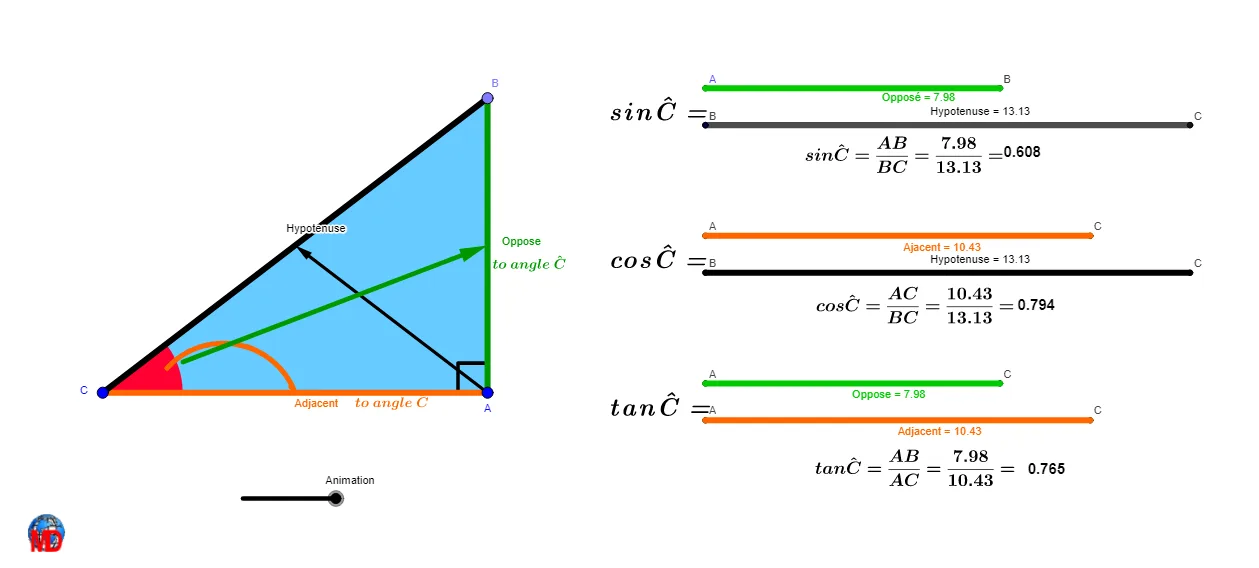
This example uses an animation to demonstrate how the trigonometric ratios of a right triangle—sine, cosine, and tangent—relate to changes in an angle α. As the triangle’s configuration evolves, the displayed ratios correspond to the geometric proportions of the triangle’s sides. The key concepts are right-triangle trig ratios, angle–side relationships, and constructing auxiliary curves/lines (circles, arcs, tangents) to make the functional meanings visible in the diagram. From the construction summary, it is built with core GeoGebra commands such as Point and Angle (to define key vertices and α), Segment and Polygon (to form the right triangle and its edges), Circle/CircleArc/CircumcircleArc with Center (to generate relevant circles and arcs), Tangent plus Intersect (to create tangent lines and their intersection points), and Geometry tools like Midpoint, Centroid, Vector, Translate, and Rotate for coordinated transformations. Animation drives the interactive exploration. Suitable for secondary-school instruction on trigonometry, geometry-construction practice, and classroom demonstrations.
GeoGebra Commands & Parameters
Midpoint(A, C) → L_1Midpoint(C, A) → H_1Circle(C, A) → cTangent(A, c) → a,Point(a) → BPolygon(C, A, B) → poly1, c_1, a_1, bCentroid(poly1) → QMidpoint(C, Q) → RMidpoint(C, R) → SAngle(B, A, C) → A_2Angle(A, C, B) → αTranslate(B, Vector[(Animation / 10 * Vector[B, D])]) → B'Translate(A, Vector[(Animation / 10 * Vector[A, F])]) → A'Segment(B', A') → fTranslate(C, Vector[(Animation / 10 * Vector[C, G])]) → C'Translate(B, Vector[(Animation / 10 * Vector[B, H])]) → B'_{1}Segment(C', B'_{1}) → gTranslate(C, Vector[(Animation / 10 * Vector[C, I])]) → C'_{1}Translate(A, Vector[(Animation / 10 * Vector[A, J])]) → A'_{1}Segment(C'_{1}, A'_{1}) → hTranslate(C, Vector[(Animation / 10 * Vector[C, K])]) → C'_{2}Translate(B, Vector[(Animation / 10 * Vector[B, L])]) → B'_{2}Segment(C'_{2}, B'_{2}) → iTranslate(B, Vector[(Animation / 10 * Vector[B, N])]) → B'_{3}Translate(A, Vector[(Animation / 10 * Vector[A, M])]) → A'_{2}Segment(A'_{2}, B'_{3}) → jTranslate(C, Vector[(Animation / 10 * Vector[C, O])]) → C'_{3}Translate(A, Vector[(Animation / 10 * Vector[A, P])]) → A'_{3}Segment(C'_{3}, A'_{3}) → kCentroid(poly1) → TCentroid(poly1) → UCentroid(poly1) → VMidpoint(B, A) → WMidpoint(Q, W) → ZMidpoint(Z, W) → A_1Midpoint(S, R) → B_1Midpoint(B_1, S) → C_1Translate(C_1, Vector[(Animation / 10 * Vector[C_1, W])]) → D_1Midpoint(C, B) → F_1Midpoint(Q, F_1) → E_1Midpoint(E_1, F_1) → G_1Translate(A, Vector[(Animation / 10 * Vector[A, F_1])]) → A'_{4}Vector(A, A'_{4}) → uVector(C_1, D_1) → vMidpoint(C, H_1) → I_1Rotate(C, If[Animation < (2 * π), (((-Animation) * π)) / 10, (-π)], I_1) → C'_{4}Midpoint(I_1, H_1) → J_1CircumcircleArc(S, R, H_1) → dCircle(S, R, H_1) → eCenter(e) → K_1Angle(L_1, K_1, S) → βRotate(S, If[Animation < 10, ((-Animation) * β / 10), (-β)], K_1) → S'CircleArc(K_1, S', S) → pMidpoint(C, S) → M_1Midpoint(M_1, S) → N_1Midpoint(N_1, S) → O_1Intersect(e, c_1) → Q_1, R_1Midpoint(S, Q_1) → S_1Midpoint(S, S_1) → T_1Midpoint(S, S_1) → U_1Rotate(U_1, If[Animation < 10, ((-Animation) * β / 10), (-β)], K_1) → P_1Vector(P_1, S') → wMidpoint(C, A) → V_1Midpoint(V_1, A) → W_1
AI Drawing Prompt Reference
Draw a right triangle ABC with angle A as the right angle and point C as the right-angle vertex. Use a slider to control the angle BAC, and animate to show how the sine, cosine, and tangent ratios change with the angle. Construct auxiliary circles, tangents, and midpoints to illustrate the relationships between the triangle's sides and angles, ultimately forming a dynamic trigonometric graph.
The prompt above was compiled from the original drawing commands and is for reference only.