
Dynamic Illustration of Right-Triangle Trig Ratios: Sine, Cosine, Tangent
Loading the math board and drawing, please wait…
In collections
Thinking Classroom Exploration: RT Trig (Solving for Sides)
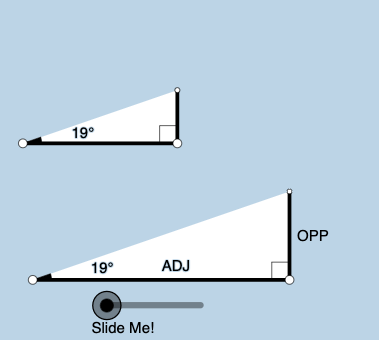
This example uses an interactive GeoGebra construction to demonstrate how the trigonometric ratios of a right triangle change dynamically as an angle varies. It focuses on the geometric meaning of sin, cos, and tan within a right triangle, combining angle measurement with geometric proportional relationships. The construction uses Point and Segment to define the triangle and its sides, OrthogonalLine to enforce the right angle, Angle to label/track the changing angle, and Ray for directional construction. Rotate and RotateText drive the dynamic motion while keeping labels aligned. Circle and Intersect compute key points linked to the circular construction that visually supports the trig ratios. Polygon highlights the triangle, and Textfield provides real-time annotations (e.g., angles and ratio values). This is well-suited for secondary school students and classroom instruction when introducing or reviewing trigonometry with geometric intuition.
GeoGebra Commands & Parameters
Point(Ray[A, A + (1, 0)]) → BSegment(A, B) → fOrthogonalLine(B, f) → gRotate(B, (a * pi / 180), A) → B'Angle(B, A, B') → αRay(A, B') → hCircle(B, 2) → cIntersect(c, g, 2) → CRay(B, C) → iIntersect(h, i) → DSegment(B, D) → jSegment(A, D) → kPolygon(A, B, D) → poly1, d, a_1, bRotate(B, If[0 < e ≤ 1, (-((e * (pi / 2 - α)))), α - pi / 2], D) → B'_1Rotate(D, If[0 < e ≤ 1, (-((e * (pi / 2 - α)))), α - pi / 2], D) → D'Segment(B'_1, D') → j'Rotate(A, If[0 < l ≤ 1, (α * l), α], A) → A'Rotate(B, If[0 < l ≤ 1, (α * l), α], A) → B'_2Segment(A', B'_2) → f'Rotate(B, If[0 < m ≤ 1, (m * pi / 2), pi / 2], B) → B'_3Rotate(D, If[0 < m ≤ 1, (m * pi / 2), pi / 2], B) → D'_1Segment(B'_3, D'_1) → j'_1Textfield(a) → InputBox1Angle(D, B, A) → βMidpoint(A, D) → ERotateText(text7, α) → text8Midpoint(A', B'_2) → FRotateText(text9, α) → text10Point(Ray[G, G + (1, 0)]) → HSegment(G, H) → tRotate(H, (a * pi / 180), G) → H'Ray(G, H') → f_1OrthogonalLine(H, t) → g_1Intersect(g_1, f_1) → IPolygon(G, H, I) → t1, i_1, g_2, h_1Angle(H, G, I) → γSegment(H, I) → j_1Rotate(H, If[0 < e ≤ 1, ((-e) * (pi / 2 - α)), (-(pi / 2 - α))], I) → H'_{1}Rotate(I, If[0 < e ≤ 1, ((-e) * (pi / 2 - α)), (-(pi / 2 - α))], I) → I'Segment(H'_{1}, I') → k_1Rotate(G, If[0 < l ≤ 1, (l * α), α], G) → G'Rotate(H, If[0 < l ≤ 1, (l * α), α], G) → H'_{2}Segment(G', H'_{2}) → t'Angle(I, H, G) → δRotate(H, If[0 < m ≤ 1, (m * pi / 2), pi / 2], H) → H'_{3}Rotate(I, If[0 < m ≤ 1, (m * pi / 2), pi / 2], H) → I'_{1}Segment(H'_{3}, I'_{1}) → l_1
AI Drawing Prompt Reference
Draw a dynamic illustration of a right triangle’s trigonometric ratios: place a fixed start point, construct the right-angle vertex, and create a perpendicular line through the vertex to define the right angle. From the start point, use a ray that can rotate so the triangle’s moving vertex traces points on a circle, forming a changing right triangle with one side and the hypotenuse. Track and label the varying angle (e.g., α) between the rays, and build auxiliary segments from circle intersections and rays so geometric pieces correspond to sine, cosine, and tangent ratios. Highlight the main triangle with a polygon fill, and add a text field that updates in real time to show the current angle or ratio values, with angle-related text rotating to stay aligned.
The prompt above was compiled from the original drawing commands and is for reference only.