
Dynamic Kite Construction and Transformation
Loading the math board and drawing, please wait…
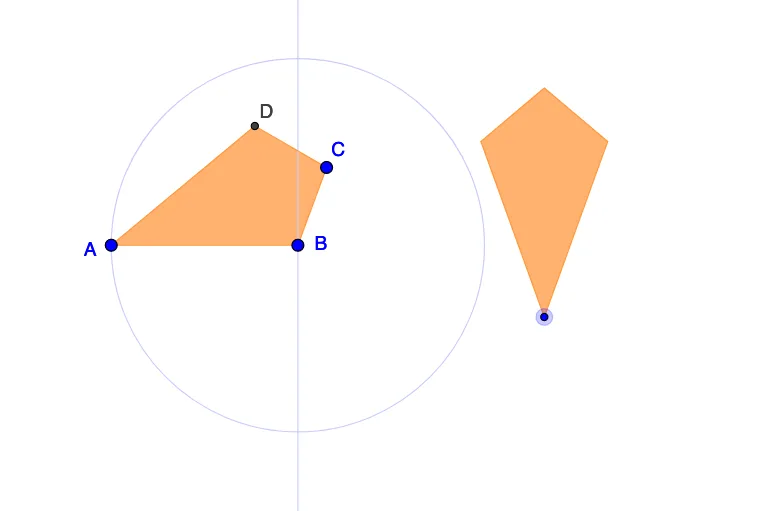
This example demonstrates a dynamic kite figure that can be adjusted to create various polygon types through geometric transformations. The core mathematical concepts include kite symmetry, angle measurement, vector length and direction, and polygon construction methods. Key construction points involve using basic objects like Segment, Circle, Polygon, combined with transformation commands such as Rotate, Translate, and Mirror. This example is suitable for middle school geometry construction lessons or high school geometry transformation units, providing hands-on practice with dynamic geometry software.
GeoGebra Commands & Parameters
Segment(A, B) → aCircle(A, B) → cSegment(A, C) → bMirror(B, b) → DPolygon(A, B, C, D) → poly1, a_1, b_1, c_1, b'Vector(A, E) → uTranslate(A, u) → A'Translate(B, u) → B'_1Translate(C, u) → C'Translate(D, u) → B''Polygon(A', B'_1, C', B'') → poly1', a', b'_1, c', b''Angle(C, A, DD) → αRotate(A', α, E) → A''Rotate(B'_1, α, E) → FRotate(C', α, E) → C''Rotate(B'', α, E) → B'''Polygon(A'', F, C'', B''') → poly1'', a'', f, c'', b'''OrthogonalLine(B, a_1) → dCircle(B, A) → e
AI Drawing Prompt Reference
Draw a dynamic kite figure. The figure consists of four points forming a kite shape. It can be adjusted by changing angles and positions. Key objects include segments, circles, and triangles. The construction order starts with basic segments, then adds circles and points, and finally combines them into a kite shape. Ensure the figure maintains symmetry and allows for transformations.
The prompt above was compiled from the original drawing commands and is for reference only.