
Forming a Right Circular Cone
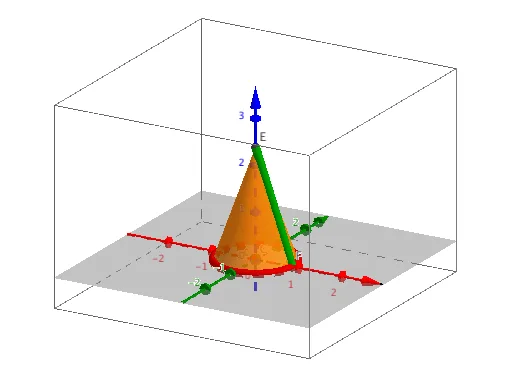
Loading the math board and drawing, please wait…
This example demonstrates the process of rolling up a sector of a circle to form a right circular cone. Key mathematical concepts include circles, sectors, and the properties of cones. Using GeoGebra commands such as CircleSector and Cone, the formation of the cone is visually illustrated. Suitable for middle school and above students to learn geometric construction and solid geometry.
GeoGebra Commands & Parameters
Circle(A, B) → cPoint(c) → DCircleSector(A, B, D) → dSegment(B, A) → aSegment(A, D) → bAngle(B, A, D) → αCircumference(c) → CflatIntersect(xAxis, yAxis) → CCircle(C, Rcone) → eCone(e, Ht) → i, k, jPoint(xAxis) → GRay(C, G) → fIntersect(e, f) → F,Segment(E, F) → gCircleArc(A, B, D) → h
AI Drawing Prompt Reference
Draw a sector of a circle and roll it up to form a right circular cone, illustrating the process of cone formation. The sector's center and two points on its edge form a circle, with lines connecting the center to the edge points and the central angle of the sector marked. A circle is drawn with the center as the origin and a specified radius, intersecting the x and y axes at a point. A circle is drawn with this point as the center, and a cone is formed based on a given height. Finally, connect the edge of the sector to the intersection point on the cone's base to show the relationship between the cone's lateral surface and the sector.
The prompt above was compiled from the original drawing commands and is for reference only.