
Dynamic Geometry Problem Example by Tim Brzezinski
Loading the math board and drawing, please wait…
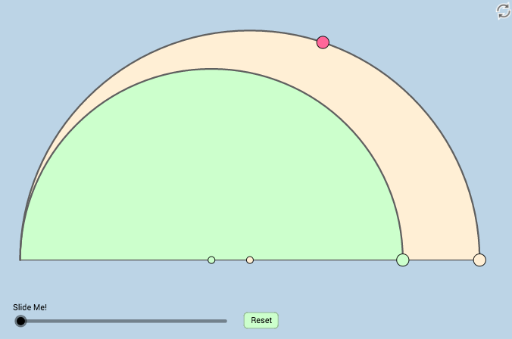
This is a dynamic and modifiable geometry problem example posted by Antonino Gutierrez on Twitter. It demonstrates the dynamic relationships between circles, semicircles, points, line segments, and other geometric elements. Using GeoGebra commands such as Circle, Semicircle, Point, Segment, etc., it provides a clear understanding of geometric transformations and construction. Suitable for high school geometry learners and teachers.
GeoGebra Commands & Parameters
Circle(A_1, A) → cCircle(C, A) → dSemicircle(A, D_1) → eSemicircle(D_1, A) → fPoint(e) → DSegment(A, D) → gIntersect(d, g, 2) → POrthogonalLine(D, h) → iIntersect(d, i, 2) → FIntersect(h, i) → ERay(A, F) → jIntersect(e, j, 2) → GOrthogonalLine(G, h) → kIntersect(d, k, 2) → MSegment(A, M) → lIntersect(i, l) → NDistance(A, g) → distanceAgDistance(A, N) → distanceANDistance(P, A) → distancePADilate(A, If[0 < m ≤ 1, 1 - m, 0], P) → A'Segment(A, A') → nDilate(P, If[1 < m ≤ 2, 2 - m, 0], D) → P'Segment(P, P') → pDilate(D, If[2 < m ≤ 3, 3 - m, 0], F) → D'Segment(D, D') → qIntersect(k, xAxis) → BAngle(G, B, A) → βAngle(D, E, A) → αDilate(F, If[3 < m ≤ 4, 4 - m, 0], E) → F'Segment(F, F') → rDilate(A, If[4 < m ≤ 5, 5 - m, 0], F) → A'_1Segment(A, A'_1) → sDilate(F, If[5 < m ≤ 6, 6 - m, 0], G) → F'_1Segment(F, F'_1) → tDilate(G, If[6 < m ≤ 7, 7 - m, 0], M) → G'Segment(G, G') → f_1Dilate(M, If[7 < m ≤ 8, 8 - m, 0], B) → M'Segment(M, M') → g_1Dilate(A, If[8 < m ≤ 9, 9 - m, 0], N) → A'_2Segment(A, A'_2) → h_1Dilate(N, If[9 < m ≤ 10, 10 - m, 0], M) → N'Segment(N, N') → i_1Intersect(e, j_1, 1) → IAngle(N, A, P) → γRotate(A, If[11 < m ≤ 12, ((m - 11) * γ), γ], A) → A'_3Rotate(A'_2, If[11 < m ≤ 12, ((m - 11) * γ), γ], A) → JSegment(A'_3, J) → k_1Semicircle(A, H) → c_1Line(P, N) → l_1Line(D, M) → m_1Line(P, D) → n_1Circle(D, 2) → d_1Intersect(d_1, n_1, 2) → KRay(D, K) → p_1Intersect(l_1, s) → LCircle(P, (0.5 * Distance[P, L])) → e_1Intersect(e_1, k_1, 1) → OIntersect(e_1, l_1, 2) → QIntersect(e_1, l_1, 1) → RRay(P, R) → q_1Circle(D, 2) → r_1Intersect(r_1, m_1, 1) → SRay(D, S) → s_1Dilate(N, If[12 < m ≤ 13, 13 - m, 0], P) → N'_1Dilate(M, If[12 < m ≤ 13, 13 - m, 0], D) → M'_1Segment(N, N'_1) → t_1Segment(M, M'_1) → a_1Angle(R, P, O) → δRotate(R, If[13 < m ≤ 14, ((m - 13) * δ), δ], P) → R'CircleSector(P, R, R') → c_2Dilate(P, If[14 < m ≤ 15, 15 - m, 0], D) → P'_1Vector(P, P'_1) → uTranslate(c_2, u) → d_2Segment(A, D_1) → b_1
AI Drawing Prompt Reference
Draw a dynamic geometry diagram featuring two circles, two semicircles, several points, and line segments. Start by constructing a circle and its semicircles, then create new points and segments using intersections and perpendicular lines. Perform a series of similarity transformations, including dilation and rotation, to observe the dynamic changes in the figure. The final diagram should illustrate the complex relationships and transformations among the geometric elements.
The prompt above was compiled from the original drawing commands and is for reference only.