
Dynamic GeoGebra Demonstration of Triangular Pyramid Volume
Loading the math board and drawing, please wait…
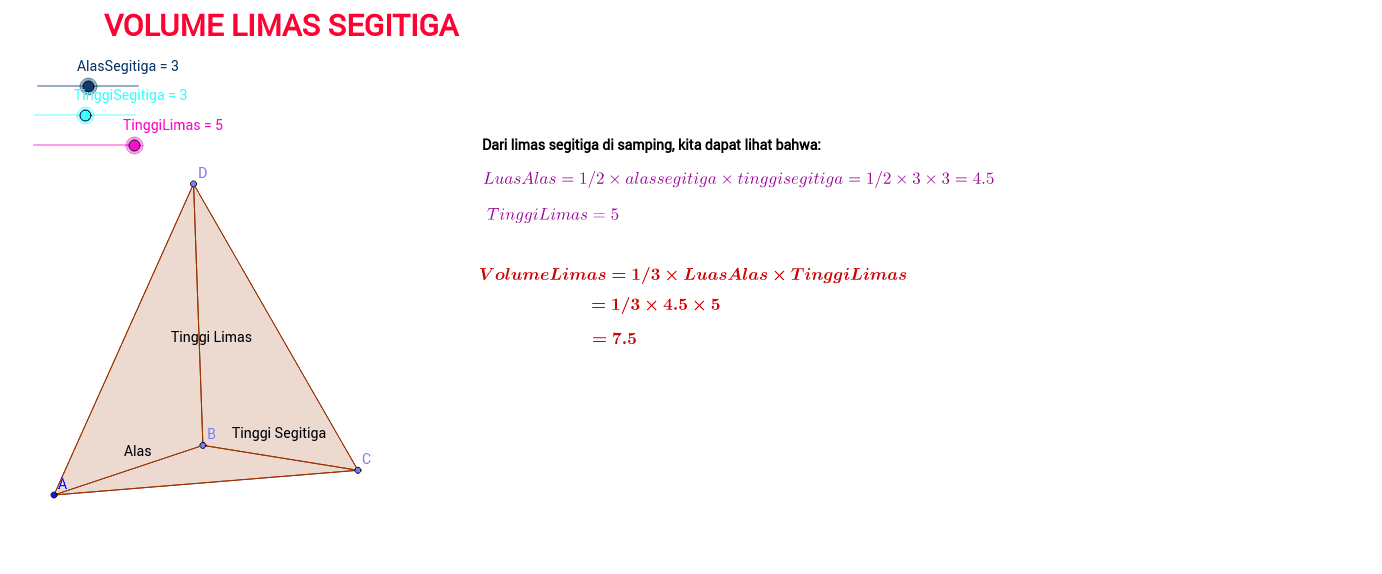
This GeoGebra example demonstrates the volume of a triangular pyramid (tetrahedron) by visualizing its triangular base, base height, and pyramid height. The main mathematical concepts include solid geometry, triangle area, the pyramid volume formula V = 1/3 × base area × height, and spatial labeling. It is constructed with the Point and Polygon commands: vertices A, B, C, and D define the pyramid, while poly1 through poly4 create the base and side polygons. Named objects such as AlasSegitiga, TinggiSegitiga, and TinggiLimas represent the base triangle, triangle height, and pyramid height. Text objects including LP, LA, DAC, TDAC, AC, and text1 through text10 annotate measurements and volume relationships. This example is suitable for middle-school or high-school geometry lessons, formula exploration, and GeoGebra-based mathematical experiments.
GeoGebra Commands & Parameters
Point(Circle[A, AlasSegitiga]) → BPoint(Circle[B, TinggiSegitiga]) → CPoint(Circle[B, TinggiLimas]) → DPolygon(A, B, C) → poly1, c, a, bPolygon(D, A, B) → poly2, b_1, d, a_1Polygon(D, C, B) → poly3, b_2, d_1, c_1Polygon(D, A, C) → poly4, c_2, d_2, a_2
AI Drawing Prompt Reference
Draw a triangular pyramid (tetrahedron) with a triangular base and an apex above it. Start by constructing the base triangle: place one vertex, then determine the second vertex using the base side length, and the third vertex using the triangle height from one endpoint. Connect these three points to form the base triangle. Then, from one base vertex, set the apex point at the pyramid height, and connect it to all three base vertices to create three side faces. Label the base triangle, the triangle height, the pyramid height, and include text annotations showing the base area, height, and volume relationship.
The prompt above was compiled from the original drawing commands and is for reference only.