
Volume of a Triangular Prism by ikayunable
Loading the math board and drawing, please wait…
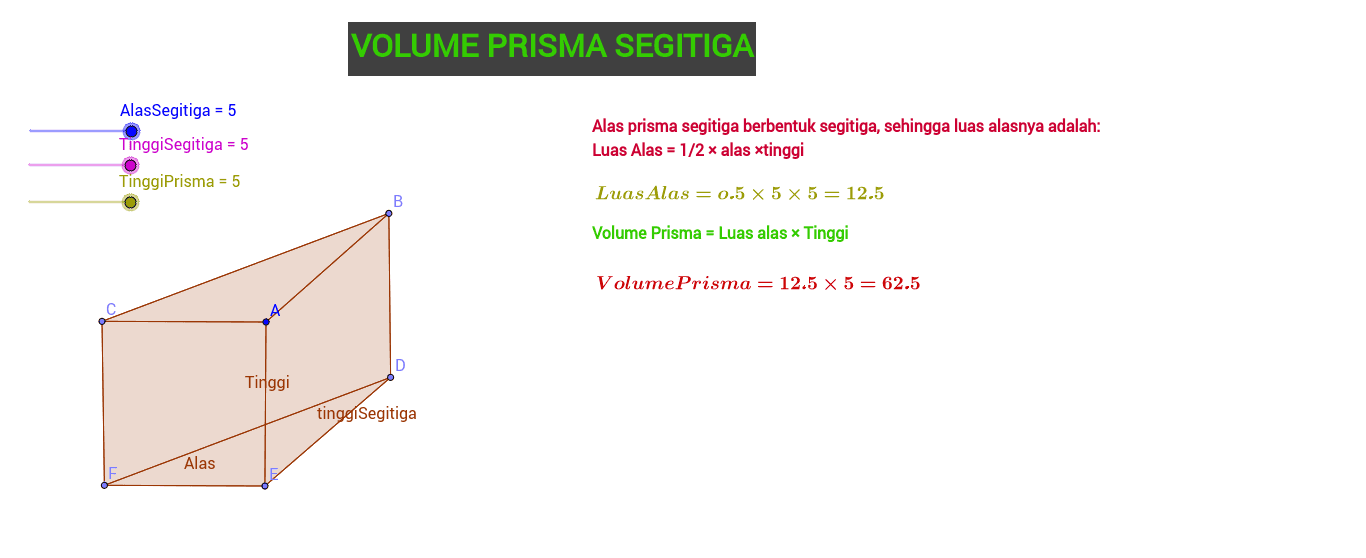
This example demonstrates how to calculate the volume of a triangular prism using GeoGebra, involving concepts like volume formulas, fractions, scalene triangles, vector operations, and optimization problems. It uses commands like Point, Polygon, and sliders, along with objects such as the base triangle, height, and prism body. Suitable for high school students learning solid geometry and optimization problems, or for mathematical modeling education.
GeoGebra Commands & Parameters
Point(Circle[A, TinggiSegitiga]) → BPoint(Circle[A, AlasSegitiga]) → CPoint(Circle[B, TinggiPrisma]) → DPoint(Circle[A, TinggiPrisma]) → EPoint(Circle[C, TinggiPrisma]) → FPolygon(A, B, C) → poly1, c, a, bPolygon(D, E, F) → poly2, f, Alas, ePolygon(A, B, D, E) → poly3, a_1, b_1, tinggiSegitiga, e_1Polygon(C, A, E, F) → poly4, c_1, Tinggi, e_2, f_1Polygon(C, B, D, F) → poly5, c_2, b_2, d_2, f_2
AI Drawing Prompt Reference
Draw a triangular prism with a scalene triangular base. The base triangle is defined by three adjustable segments: one for the base side, one for the triangle's height, and one for the prism's height. From each vertex of the base, extend a vertical segment of equal length (the prism height) to obtain the top triangle's vertices. Connect corresponding vertices to form three parallelogram side faces. The prism appears tilted, with all dimensions adjustable via sliders, suitable for demonstrating volume calculation and optimization.
The prompt above was compiled from the original drawing commands and is for reference only.