
Dynamic Demonstration of Triangle Angle Trisectors
Loading the math board and drawing, please wait…
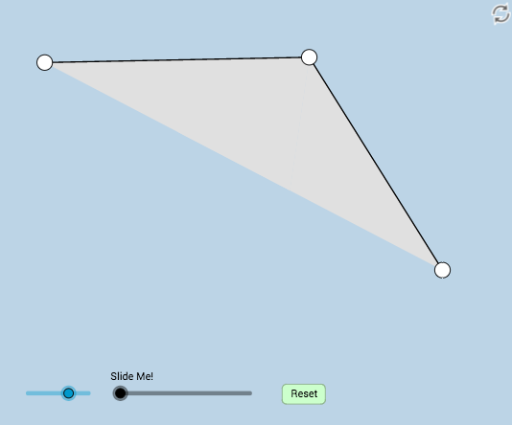
This example dynamically illustrates the properties and relationships of angle trisectors in a triangle. Key math concepts involved include angles, vectors, geometric transformations, and functions. Construction highlights the use of GeoGebra commands and objects such as Rotate, Angle, Segment, Ray, Point, LineBisector, Line, OrthogonalLine, Intersect, Dilate, Midpoint, Min, Circle, CircleSector, Polygon, Vector, and Translate. Suitable for high school mathematics instruction and geometric construction learning.
GeoGebra Commands & Parameters
Rotate(A, (-((a * π / 180))), B) → A'Angle(A', B, A) → αSegment(A, B) → fRay(B, A') → gPoint(g) → CSegment(A, C) → hSegment(B, C) → iLineBisector(i) → jLineBisector(f) → kLine(A, B) → mOrthogonalLine(C, m) → nIntersect(m, n) → EAngle(E, C, A) → γAngle(E, A, C) → εDilate(C, If[3 < o ≤ 4, 4 - o, 0], E) → C'_1Dilate(B, If[3 < o ≤ 4, 4 - o, 0], E) → B'Midpoint(A, B) → JSegment(A, E) → g_1Segment(A, J) → h_1Min(f, i) → uCircle(B, (0.2 * u)) → r_1Intersect(r_1, f) → K,Intersect(r_1, i) → L,CircleSector(B, L, K) → s_1Point(f) → MSegment(C, M) → pLine(C, M) → qOrthogonalLine(A, q) → rLine(C, B) → sOrthogonalLine(A, s) → cAngle(A, C, M) → θDilate(C, If[0 < o ≤ 1, 1 - o, 0], M) → C'_2Angle(A, C, B) → κ_2Polygon(A, B, C) → poly1, c_2, a_1, bCircle(B, 1) → dCircle(C, 1) → t_1Intersect(d, s) → D, FIntersect(t_1, s) → G, HAngle(C, B, A) → δRotate(C, δ / 3, B) → C'Angle(C, B, C') → κRotate(C', κ, B) → C''Angle(C', B, C'') → ηLine(B, C') → f_2Line(B, C'') → g_2Circle(C, h / 3) → d_2Intersect(d_2, h) → I,Circle(I, h / 3) → e_2Intersect(e_2, h) → S, TIntersect(f_2, h) → UIntersect(g_2, h) → VIntersect(r_1, f_2, 2) → WIntersect(r_1, g_2) → Z, A_1CircleSector(B, L, W) → h_2Polygon(C, U, B) → poly2, b_2, c_3, u_1Polygon(U, B, V) → poly3, v_1, u_2, b_3Polygon(V, B, A) → poly4, a_2, v_2, b_4Line(C, A) → i_2Dilate(C, If[0 < o ≤ 1, 1 - o, 0], I) → C'_3Segment(C, C'_3) → tRotate(C, If[1 < o ≤ 2, ((o - 1) * π), π], I) → C'_4Rotate(C'_3, If[1 < o ≤ 2, ((o - 1) * π), π], I) → NSegment(C'_4, N) → t'Polygon(U, V, B) → poly5, b_5, u_3, vRotate(C'_4, If[2 < o ≤ 3, ((o - 2) * π), π], S) → PRotate(N, If[2 < o ≤ 3, ((o - 2) * π), π], S) → N'Segment(P, N') → t''Dilate(B, If[3.5 < o ≤ 4.5, 4.5 - o, 0], U) → B'_1Dilate(B, If[3.5 < o ≤ 4.5, 4.5 - o, 0], V) → B'_2Segment(B, B'_1) → lSegment(B, B'_2) → ePolygon(U, V, B) → poly6, b_1, u_4, v_3Rotate(h_2, If[5 < o ≤ 6, ((o - 5) * κ), κ], B) → c_1Rotate(c_1, If[6.5 < o ≤ 7.5, ((o - 6.5) * κ), κ], B) → d_1Dilate(U, If[7.5 < o ≤ 8.5, 8.5 - o, 0], V) → U'Segment(U, U') → f_1Dilate(V, If[9 < o ≤ 10, 10 - o, 0], I) → V'Vector(V, V') → wTranslate(U, w) → U'_1Polygon(U'_1, V', B) → poly7, b_6, u'_1, v'Segment(U'_1, V') → i_1Segment(B, U'_1) → j_1Segment(B, I) → k_1Polygon(V, V', B) → poly8, b_7, v_4, v'_1Segment(B, V') → l_1Polygon(V', B, V) → poly9, v_5, v'_2, b_8
AI Drawing Prompt Reference
Draw a triangle and dynamically illustrate the properties and relationships of its angle trisectors. Start by drawing the triangle's vertices and sides, then construct the trisectors of each angle, coloring them differently. Find points on the trisectors and connect them to form new geometric figures. Finally, add a slider to dynamically adjust the triangle's shape and observe how the trisectors behave.
The prompt above was compiled from the original drawing commands and is for reference only.