
Dynamic Demonstration of Isosceles Triangles and Parallelograms
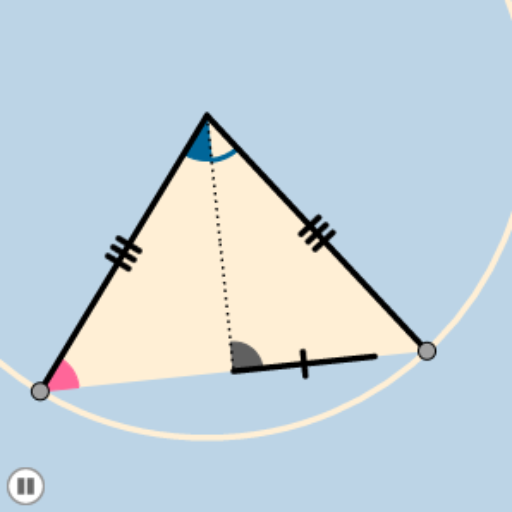
Loading the math board and drawing, please wait…
In collections
Congruence (CO) Cluster
Congruence (Vol 2)
CCSS High School: Geometry (Congruence) Volume 2
CCSS High School: Geometry (Congruence) Volume 2
CCSS High School: Geometry (Congruence) Volume 2
Geometry (Congruence) Volume 2
CCSS High School: Geometry (Congruence) Volume 2
CCSS High School: Geometry (Congruence) Volume 2
CCSS High School: Geometry (Congruence) Volume 2
CCSS High School: Geometry (Congruence) Volume 2
CCSS High School: Geometry (Congruence) Volume 2
CCSS High School: Geometry (Congruence) Volume 2
CCSS High School: Geometry (Congruence) Volume 2
Gail LeBlancCCSS High School: Geometry (Congruence) Volume 2
CCSS High School: Geometry (Congruence) Volume 2
This example demonstrates the dynamic changes of isosceles triangles and parallelograms. Key mathematical concepts include the properties of isosceles triangles and parallelograms. Using GeoGebra commands such as Circle, Intersect, CircleArc, Point, Dilate, Segment, Angle, Rotate, Midpoint, CircleSector, Polygon, Vector, Translate, the dynamic geometric figures can be constructed. Suitable for middle and high school students to learn geometric transformations and dynamic geometry.
GeoGebra Commands & Parameters
Circle(A, B) → cIntersect(c, q) → O, PCircleArc(A, O, P) → dPoint(d) → CCircleArc(A, C, P) → ePoint(e) → DDilate(A, If[0 < j ≤ 1, 1 - j, 0], C) → A'Segment(A, A') → aAngle(C, A, D) → αRotate(A, If[1 < j ≤ 2, ((j - 1) * α), α], A) → A'_1Rotate(A', If[1 < j ≤ 2, ((j - 1) * α), α], A) → A''Segment(A'_1, A'') → a'Segment(A, C) → bSegment(C, D) → fSegment(D, A) → gMidpoint(f) → ESegment(A, E) → hMidpoint(h) → FSegment(A, F) → iSegment(F, E) → kCircle(A, (0.35 * i)) → pCircle(E, (0.15 * Distance[D, E])) → rIntersect(r, f, 2) → GIntersect(r, h, 1) → HIntersect(r, f, 1) → IIntersect(p, b, 1) → JIntersect(p, h, 1) → KIntersect(p, g, 1) → LCircleSector(A, K, L) → sCircleSector(E, G, H) → tCircle(A, B) → c_1Dilate(C, If[2 < j ≤ 3, 3 - j, 0], D) → C'Segment(C, C') → lPolygon(C, D, A) → poly1, a_1, c_2, d_1Circle(C, (0.2 * Distance[D, E])) → e_1Intersect(e_1, b) → M,Intersect(e_1, f) → N,CircleSector(C, N, M) → f_1Dilate(A, If[3 < j ≤ 4, 4 - j, 0], F) → A'_2Segment(A, A'_2) → mRotate(s, If[4 < j ≤ 5, ((-(j - 4)) * α / 2), ((-α)) / 2], A) → s'Dilate(F, If[5 < j ≤ 6, 6 - j, 0], E) → F'Segment(F, F') → nCircleArc(A, K, L) → g_1Dilate(E, If[6 < j ≤ 7, 7 - j, 0], D) → E'Segment(E, E') → b_1Rotate(E, If[7 < j ≤ 8, ((j - 7) * π), 3.141592653589793], E) → E'_1Rotate(E', If[7 < j ≤ 8, ((j - 7) * π), 3.141592653589793], E) → E''Segment(E'_1, E'') → h_1Rotate(t, If[8 < j ≤ 9, ((j - 8) * π / 2), 1.5707963267948966], E) → t'CircleArc(E, G, H) → k_1Dilate(C, If[9 < j ≤ 10, 10 - j, 0], D) → C'_1Vector(C, C'_1) → uTranslate(f_1, u) → p_1CircleArc(C, N, M) → q_1Angle(E, C, A) → βRotate(p_1, If[10 < j ≤ 11, ((j - 10) * (π - β)), π - β], D) → r_1
AI Drawing Prompt Reference
Draw an isosceles triangle and a parallelogram, and use a slider to dynamically change their shapes. Start by drawing an isosceles triangle ABC, then construct parallelogram ACDE using points A, C, and D. Apply rotation and translation commands to change the size and position of the triangle and parallelogram, observing their properties as they change.
The prompt above was compiled from the original drawing commands and is for reference only.