
Dynamic Demonstration of Dividing Polygon Area
Loading the math board and drawing, please wait…
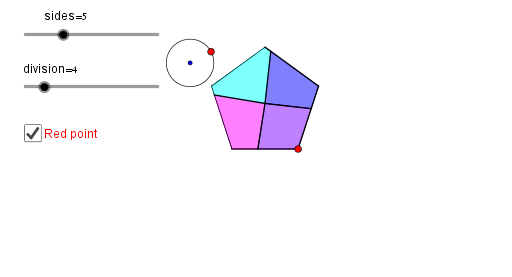
This example demonstrates how to evenly divide the area of a perfect polygon into several parts. Key mathematical concepts include polygons and area. It is constructed using GeoGebra commands such as Ray, Polygon, and Centroid. Suitable for middle school and above students or teachers for teaching purposes.
GeoGebra Commands & Parameters
Ray(A, O) → qPoint(q) → BPolygon(A, B, d) → poly1, f, p, C, D, G, H, I, J, K, L, g, h, i, j, k, l, m, nCentroid(poly1) → ECircle(E, F) → cSequence(Intersect[c, Element[Sequence[Ray[E, Element[Sequence[Point[poly1, Mod[a + m / b, 1]], m, 1, b], k]], k, 1, b], n]], n, 1, b) → list1Join({Last[list1, b - 1], First[list1, 1]}) → list2Sequence(Polygon[E, Element[list1, n], Element[list2, n]], n, 1, b) → list3Sequence(IntersectPath[poly1, Element[list3, n]], n, 1, b) → list4Circle(M, 0.5) → ePoint(e) → NSequence(Segment[E, Element[Sequence[Point[poly1, Mod[a + m / b, 1]], m, 1, b], n]], n, 1, b) → list6Element(list4, 1) → A1Element(list4, 2) → A2Element(list4, 3) → A3Element(list4, 4) → A4Element(list4, 5) → A5Element(list4, 6) → A6Element(list4, 7) → A7Element(list4, 8) → A8Element(list4, 9) → A9Element(list4, 10) → A10Sequence(Segment[E, Element[Sequence[Point[poly1, Mod[a + m / b, 1]], m, 1, b], n]], n, 1, b) → list7Element(list7, 1) → B1Element(list7, 2) → B2Element(list7, 3) → B3Element(list7, 4) → B4Element(list7, 5) → B5Element(list7, 6) → B6Element(list7, 7) → B7Element(list7, 8) → B8Element(list7, 9) → B9Element(list7, 10) → B10
AI Drawing Prompt Reference
Draw a regular polygon and divide its area into several equal parts. Start by drawing the sides and diagonals of the polygon, then find its centroid. Draw a circle centered at the centroid. From the centroid, draw several rays that intersect the circle, dividing the polygon into several sections. Finally, connect these intersection points to form new polygons, ensuring each section has equal area.
The prompt above was compiled from the original drawing commands and is for reference only.