
Dynamic Construction for SAS Triangle Congruence
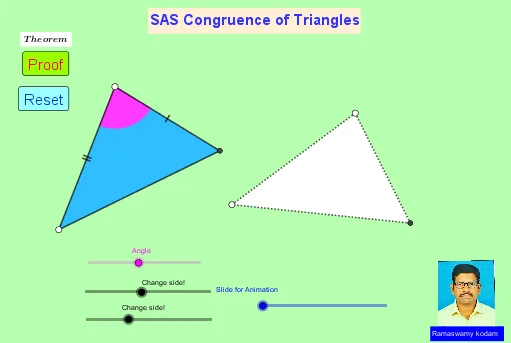
Loading the math board and drawing, please wait…
This example demonstrates the triangle congruence phenomenon: if two triangles have two corresponding sides and the included angle equal (the SAS condition), then the triangles are congruent, which forces all corresponding angles and sides to match.
It centers on SAS congruence of triangles, geometric angle relationships, and construction constraints using circles. The construction also highlights how geometric transformations preserve distances and angles.
In GeoGebra, the model is built with commands such as Circle and Point to create circle-based constraints, Segment to define triangle sides, and Angle to mark the included angle. Intersect is used to compute the required key points, while Rotate and Translate place the corresponding triangle in a controlled way. Additional tools like CircleSector and Dilate support region/structure construction and consistency checks. The scene includes many labeled points (e.g., A, B, C, D, E) and angle parameters (e.g., α, β) to make the correspondence explicit.
Suitable for middle to high school geometry lessons, especially for teaching and practicing SAS congruence and interactive proof visualization.
GeoGebra Commands & Parameters
Circle(A, a) → cCircle(B, a) → dCircle(A, b) → eCircle(B, b) → fPoint(c) → DPoint(d) → ESegment(A, D) → gSegment(B, E) → hRotate(D, α, A) → D'Angle(D, A, D') → βRotate(E, α, B) → E'Angle(E, B, E') → γSegment(A, D') → iSegment(B, E') → jIntersect(e, i) → C,Intersect(f, j) → F,Segment(A, C) → kSegment(C, D) → lSegment(B, F) → mSegment(F, E) → nSegment(A, B) → pCircle(A, ((a + b) * 0.15)) → qIntersect(q, g) → G,Intersect(i, k) → HIntersect(q, k) → I,CircleSector(A, G, I) → rDilate(D, If[0 < o ≤ 1, 1 - o, 0], E) → D'_1Vector(D, D'_1) → uTranslate(A, u) → A'Translate(D, u) → D'_2Segment(A', D'_2) → g'Line(A, h) → sAngle(s, g) → δRotate(A', If[1 < o ≤ 2, ((-(o - 1)) * δ), (-δ)], E) → A''Rotate(D'_2, If[1 < o ≤ 2, ((-(o - 1)) * δ), (-δ)], E) → JSegment(A'', J) → g''Dilate(A, If[2 < o ≤ 3, 3 - o, 0], B) → A'_1Vector(A, A'_1) → vTranslate(r, v) → r'Translate(A, v) → A'_2Translate(C, v) → C'Segment(A'_2, C') → k'Line(A, m) → tAngle(t, k) → εRotate(r', If[3 < o ≤ 4, ((-(o - 3)) * ε), (-ε)], B) → r''Rotate(A'_2, If[3 < o ≤ 4, ((-(o - 3)) * ε), (-ε)], B) → KRotate(C', If[3 < o ≤ 4, ((-(o - 3)) * ε), (-ε)], B) → C''Segment(K, C'') → k''Dilate(A, If[4 < o ≤ 5, 5 - o, 0], B) → A'_3Polygon(A, D, C) → t1, c_1, a_1, d_1Polygon(B, E, F) → t2, f_1, b_1, e_1Vector(A, A'_3) → wTranslate(A, w) → A'_4Translate(D, w) → D'_3Translate(C, w) → C'_1Polygon(A'_4, D'_3, C'_1) → t1', c'_1, a'_4, d'_3Rotate(A'_4, If[5 < o ≤ 6, ((-(o - 5)) * δ), (-δ)], B) → LRotate(D'_3, If[5 < o ≤ 6, ((-(o - 5)) * δ), (-δ)], B) → MRotate(C'_1, If[5 < o ≤ 6, ((-(o - 5)) * δ), (-δ)], B) → NPolygon(L, M, N) → t1'', n_1, l_1, m_1
AI Drawing Prompt Reference
Draw a pair of congruent triangles with two equal sides and the included angle. Start by drawing circles with centers A and B and radii a and b, respectively, to find points D and E as the endpoints of the equal sides. Then, draw circles with centers A and B and radii a and b to find points D' and E' as rotation centers, rotate by angle α to get the other endpoints of the equal sides. Next, connect points A and D', B and E', and find their intersection points C and F to form triangles ABC and DEF. Finally, use rotation and scaling to ensure the triangles are congruent, with all corresponding sides and angles equal.
The prompt above was compiled from the original drawing commands and is for reference only.