
Dynamic Cone and Pyramid by David Wees
Loading the math board and drawing, please wait…
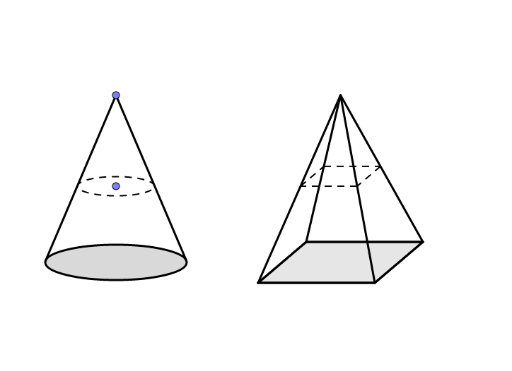
This example dynamically demonstrates the geometric shapes and relationships of cones and pyramids. It involves core mathematical concepts such as logarithmic functions, integral calculus, geometric mean, limits, and interest calculation. Construction highlights include the use of GeoGebra commands/objects like Line, OrthogonalLine, Point, Tangent, Intersect, Segment, Circle, LineBisector, Polygon. Suitable for high school and above learners to understand spatial geometry and advanced mathematical applications.
GeoGebra Commands & Parameters
Line(B, A) → fOrthogonalLine(E, f) → gPoint(g) → FTangent(F, c) → h, iIntersect(c, h, 1) → CIntersect(c, i, 1) → DSegment(F, C) → jSegment(F, D) → kLine(F, f) → lSegment(F, E) → rPoint(r) → KOrthogonalLine(K, r) → tSegment(K, E) → eLine(G, H) → mLine(I, G) → nLine(H, n) → pLine(I, m) → qCircle(G, I) → dIntersect(d, n, 2) → JLine(J, m) → sIntersect(p, q) → LIntersect(p, s) → MLineBisector(H, G) → f_1Intersect(m, f_1) → NIntersect(l, f_1) → OSegment(I, J) → g_1Segment(J, M) → h_1Segment(M, L) → i_1Segment(L, I) → j_1Segment(I, O) → k_1Segment(J, O) → l_1Segment(M, O) → m_1Segment(L, O) → n_1Polygon(I, J, M, L) → poly1, i_2, j_2, m_2, l_2Segment(O, N) → p_1Intersect(t, p_1) → PIntersect(t, k_1) → QIntersect(t, n_1) → RLine(Q, g_1) → q_1Line(R, i_1) → r_1Intersect(q_1, l_1) → SIntersect(r_1, m_1) → TSegment(S, T) → s_1Segment(T, R) → t_1Segment(R, Q) → a_1Segment(Q, S) → b_1
AI Drawing Prompt Reference
Draw a dynamic model of a cone and a pyramid to demonstrate their geometric shapes and relationships. Start by constructing the base and side of the cone, then the base and side of the pyramid. Use lines, orthogonal lines, tangents, intersections, segments, and circles to build these shapes. Show the slant height and vertex of the cone, and the edges and height of the pyramid. Observe how the volume and surface area change as you dynamically adjust parameters.
The prompt above was compiled from the original drawing commands and is for reference only.