
Drag 2x3 Rectangle to Fit in 3x6 Frame
Loading the math board and drawing, please wait…
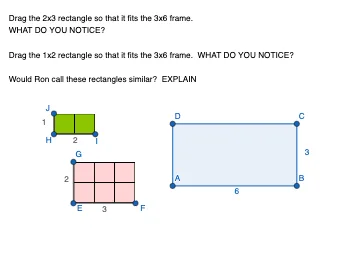
This example demonstrates how to drag and stretch a 2x3 rectangle to fit into a 3x6 frame. Key mathematical concepts include similarity transformation or similarity, proportions, and fractions. Using GeoGebra commands such as Polygon, Line, OrthogonalLine, Point, and Segment, this dynamic geometric construction is created. Suitable for middle school and above students to learn about similarity transformations and proportions.
GeoGebra Commands & Parameters
Polygon(A, B, C, D) → q1, a, b, c, dLine(E, a) → fOrthogonalLine(E, f) → gPoint(f) → FPoint(g) → GLine(H, a) → hOrthogonalLine(H, h) → iPoint(h) → IPoint(i) → JSegment(E, F) → jSegment(E, G) → kSegment(H, I) → lSegment(H, J) → mSegment(H, I) → nSegment(H, J) → p
AI Drawing Prompt Reference
Draw a 3x6 frame and drag a 2x3 rectangle inside to fit, demonstrating similarity transformation or proportion, by constructing dynamic geometric shapes with polygons, lines, and orthogonal lines, suitable for middle school students to learn about similarity transformations and proportions.
The prompt above was compiled from the original drawing commands and is for reference only.