
Stretching Triangles: Multiplying vs. Adding a Unit
Loading the math board and drawing, please wait…
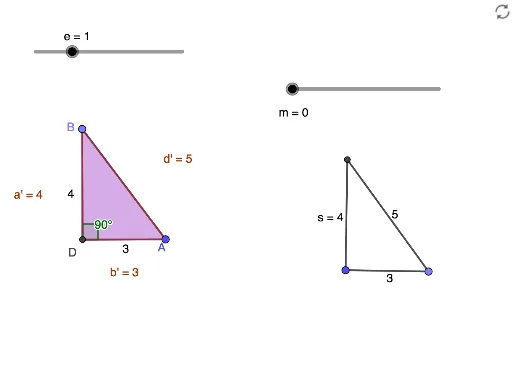
This GeoGebra applet demonstrates what happens when the sides of a triangle are increased by multiplying by a unit versus adding a unit. It involves the core concepts of similar triangles and similarity transformations (dilation). The construction uses commands like Point, Segment, Circle, Intersect, Angle, Polygon, and Dilate to create the original triangle and compare the two types of transformations: one using dilation (multiplication) and the other by extending sides (addition). Suitable for middle school and high school students learning about similarity and geometric transformations.
GeoGebra Commands & Parameters
Point(Circle[A, 5]) → BSegment(A, B) → fCircle(A, 3) → cCircle(B, 4) → dIntersect(d, c) → C, D, ,Segment(A, D) → gSegment(B, D) → hAngle(B, D, A) → αPolygon(A, B, D) → t1, d_1, a, bDilate(A, e, D) → A'Dilate(B, e, D) → B'Dilate(D, e, D) → D'Polygon(A', B', D') → t1', d', a', b'Point(Circle[J, 3 + m]) → KSegment(J, K) → nCircle(J, 4 + m) → qCircle(K, 5 + m) → rIntersect(q, r) → L, M, ,Segment(J, L) → sSegment(K, L) → t
AI Drawing Prompt Reference
Draw two triangles for comparison demonstration. First triangle: create a circle, pick a point on it, draw line segments from the circle center to another point on the circle forming a triangle; then apply a dilation transformation centered at a point to create an enlarged similar triangle. Second triangle: create a circle centered at a point, pick a point on it, form a triangle, then extend all three sides by adding a fixed length to each. Show two different transformation methods: one using proportional scaling, the other adding a constant unit to side lengths.
The prompt above was compiled from the original drawing commands and is for reference only.