
Exploring Triangle Stretching
Loading the math board and drawing, please wait…
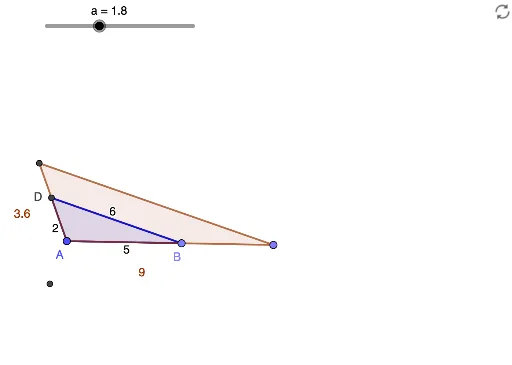
This example demonstrates the changes after stretching a triangle, focusing on what remains constant and the variations in side lengths. Core mathematical concepts include similar triangles and similarity transformations. Construction highlights the use of GeoGebra commands and objects like Point, Segment, Circle, Intersect, Polygon, and Dilate. Suitable for high school students learning about geometric transformations and similarity.
GeoGebra Commands & Parameters
Point(Circle[A, 5]) → BSegment(A, B) → fCircle(A, 2) → cCircle(B, 6) → dIntersect(d, c) → C, D, ,Segment(A, D) → gSegment(B, D) → hPolygon(D, A, B) → t1, b, d_1, a_1Dilate(D, a, A) → D'Dilate(A, a, A) → A'Dilate(B, a, A) → B'Polygon(D', A', B') → t1', b', d', a'
AI Drawing Prompt Reference
Start by drawing a circle and pick a point on it as one vertex of a triangle. Connect this point to the center to form a side. Then draw two circles centered at the center and that point, respectively, with different radii. Their intersections give two points; choose one intersection to form a triangle with the center and the initial point. Next, dilate all three vertices of the triangle about the center by a fixed scale factor, producing a new triangle. The original and new triangles are similar, with corresponding sides parallel, and the center, each original vertex, and its dilated image are collinear.
The prompt above was compiled from the original drawing commands and is for reference only.