
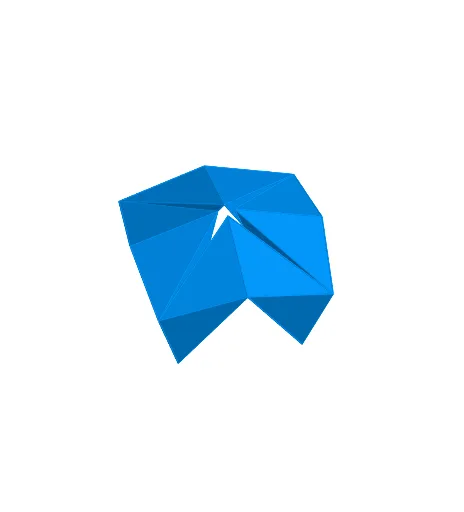
Double Skew Tetrahedra Model
Loading the math board and drawing, please wait…
In collections
Action Modular Origami
This is an animation of a modular origami model from the book 'Action Modular Origami'. The model demonstrates the folding process of double skew tetrahedra. Key mathematical concepts include solid geometry and geometric construction. Using various GeoGebra commands such as rotation, mirroring, and plane intersection, a complex geometric structure can be constructed. Suitable for high school students and origami enthusiasts interested in geometry.
GeoGebra Commands & Parameters
OrthogonalLine(A, xOyPlane) → fPoint(f) → D_1Line(A, B) → gPoint(g) → VPlane(D_1, V, A) → d_1Point(g) → CMidpoint(C, V) → C_1Point(Circle[C, Distance[A, C], Segment[A, C]]) → FRotate(C, 45°, F) → C'Point(Circle[C', Distance[F, C'], Segment[F, C']]) → PCube(F, C', P) → n, Q, facePQUT, faceRSTU, edgeFQ, edgeC'F, edgeC'P, edgePQ, edgeFR, edgeQU, edgeRU, edgeRS, R, edgeC'S, edgeST, edgePT, edgeTU, S, T, U, faceC'FQP, faceFQUR, faceC'FRS, faceC'PTSCube(A, C, F) → b, G, faceFGKJ, faceHIJK, edgeAG, edgeAC, edgeCF, edgeFG, edgeAH, edgeGK, edgeHK, edgeHI, H, edgeCI, edgeIJ, edgeFJ, edgeJK, I, J, K, faceACFG, faceAGKH, faceACIH, faceCFJIPlane(A, F, J) → dLine(A, F) → qPoint(q) → WMidpoint(W, F) → F_1Rotate(C, (2 * α), C_1, d_1) → C'_1Sphere(C'_1, 1) → u_1Rotate(R, (-α), F, d) → R'Line(F, L) → tOrthogonalLine(W, t, d) → g_1Intersect(t, g_1) → A_1Circle(A_1, 1, d) → q_1Intersect(t, q_1) → I_1, J_1Rotate(F, (-2 * α), F_1, d) → F'_1Plane(C'_1, I_1, F'') → o_1OrthogonalLine(C'_1, o_1) → t_1Intersect(t_1, u_1) → K_1, L_1OrthogonalLine(L_1, d_1) → g_2Intersect(g_2, d_1) → M_1OrthogonalLine(C, g, xOyPlane) → iCircle(C, A, xOyPlane) → cIntersect(i, c) → D, EPolygon(A, C, E) → poly1, e, a, c_1OrthogonalLine(F, q, xOyPlane) → h_1Vector(E, A_1) → vRotate(Translate[Rotate[F, (-α), h_1], v], β, q) → F'Plane(F'', F', F) → b_1Angle(F'', F, F', b_1) → δPolygon(C, F, J) → poly2, j, c_2, f_1Polygon(A, C, J) → poly3, j_1, a_1, c_3Polygon(A, F, J) → poly4, j_2, a_2, f_2Translate({poly1, poly2, poly3, poly4}, Vector[A, A]) → SkewTetTranslate(Rotate[SkewTet, (-α), h_1], v) → SkewTet'_1OrthogonalLine(F, b_1) → k_1OrthogonalLine(A_1, q, d) → i_1Intersect(q, i_1) → B_1Polygon(F, S, C') → poly5, c'_1, f_3, sIntersect(g, c) → M, NOrthogonalLine(M, g, xOyPlane) → lOrthogonalLine(A, g, xOyPlane) → hOrthogonalLine(F, h, xOyPlane) → mIntersect(l, m) → ORotate(O, 45°, F) → O'Polygon(S, F, O') → poly8, o'_2, s_2, f_5Polygon(S, O', C') → poly7, c'_2, s_1, o'_1Polygon(C', F, O') → poly6, o', c', f_4Mirror(SkewTet, d) → SkewTet'Sequence(Rotate[{SkewTet, SkewTet'}, (n * 90°), f], n, 0, 3, 1) → pos1Circle(i, C) → kVector(E, W) → uTranslate({poly5, poly6, poly7, poly8}, u) → SkewTet2Mirror(SkewTet2, d) → SkewTet2'Sequence(Rotate[{SkewTet2, SkewTet2'}, (n * 90°), f], n, 0, 3, 1) → pos2Translate(Q, u) → Q'Plane(V, faceCFJI) → oOrthogonalLine(Q', g, xOyPlane) → rIntersect(r, g) → ZRotate(SkewTet2, 180°, r) → SkewTet3_1Mirror(SkewTet3_1, d) → SkewTet3'_1Rotate(SkewTet, (-(180°)), i) → SkewTet3'Rotate(SkewTet', (-(180°)), m) → SkewTet3Sequence(Rotate[{SkewTet3, SkewTet3'}, (n * 90°), f], n, 0, 3, 1) → pos3Mirror(pos1, xOyPlane) → pos4Circle(F, R, d) → pRotate(Rotate[SkewTet'_1, β, q], γ, k_1) → SkewTet01Mirror(SkewTet01, d) → SkewTet01'Vector(W, W) → wTranslate(SkewTet01, w) → SkewTet01'_1Sequence(Rotate[{SkewTet01'_1, Mirror[SkewTet01'_1, d]}, (n * 90°), f], n, 0, 3, 1) → pos01Rotate(Translate[Rotate[poly4, (-α), h_1], v], β, q) → poly9Mirror(poly9, d) → poly9'Point(pos01) → E_1Circle(C_1, C, d_1) → e_1Circle(F_1, F, d) → p_1Intersect(h_1, m) → G_1Segment(F, J) → l_1Point(xAxis) → H_1Segment(F'', I_1) → m_1Segment(C'_1, F'') → n_1Polygon(ZZZ, C'_1, F'') → poly10, h_2, k_2, l_2Segment(C'_1, I_1) → r_1Polygon(ZZZ, I_1, F'') → poly11, i_2, m_2, n_2Polygon(F'', I_1, C'_1) → poly12, c'_4, f''_2, i_3Polygon(ZZZ, C'_1, I_1) → poly13, p_2, q_2, r_2Sequence(Rotate[{{poly10, poly11, poly12, poly13}, Mirror[{poly10, poly11, poly12, poly13}, d]}, (n * 90°), f], n, 0, 3, 1) → pos10Distance(C'_1, F'_1) → distanceC'1F'1
AI Drawing Prompt Reference
Draw a double skew tetrahedron model, including four tetrahedra n, b, SkewTet, and SkewTet'_1. First, construct tetrahedra n and b, then use rotation and mirroring to create SkewTet. Next, apply a series of rotations and translations to create SkewTet'_1. Ensure all edges and faces of the tetrahedra are correctly connected to form a complex geometric structure.
The prompt above was compiled from the original drawing commands and is for reference only.