
Dot Product of Two Vectors
Loading the math board and drawing, please wait…
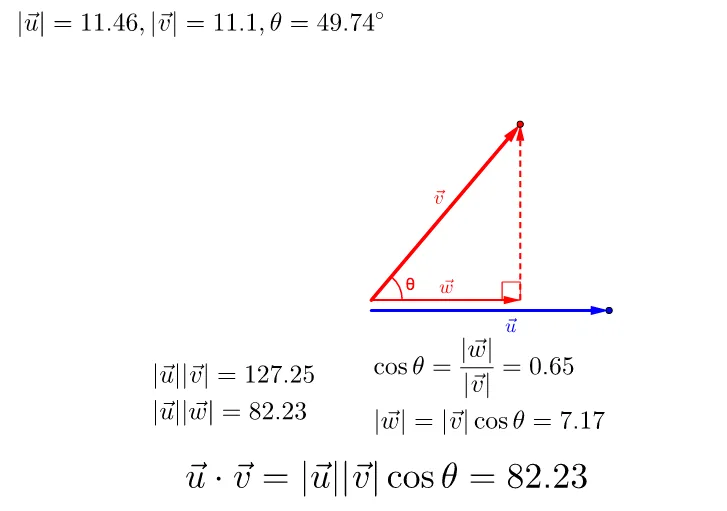
This example demonstrates the calculation and geometric interpretation of the dot product between two vectors. Key math concepts include vector operations, dot product formula, trigonometric relationships, and vector magnitudes. Constructed using GeoGebra commands like Point, Vector, and Angle to visualize the dot product. Suitable for high school mathematics education to understand vector operations and geometric intuition.
GeoGebra Commands & Parameters
Point(xAxis) → AVector(A) → uVector(B, C) → vVector(B, D) → wVector(D, C) → aAngle(B, D, C) → αAngle(D, B, C) → β
AI Drawing Prompt Reference
Create a single 2D geometry diagram on a plane: place a starting point on a reference axis, then form a first vector originating from that point. Choose three additional points to define two vectors from the same start point to two different endpoints, and also define another vector by connecting the remaining endpoints accordingly. Finally, mark two key angles using three-point angle definitions, one at the location corresponding to the first chosen angle and the other at the location corresponding to the second chosen angle. Keep the shared endpoints consistent so the directions of the vectors and the relationships between the angles are visually clear.
The prompt above was compiled from the original drawing commands and is for reference only.