
Dome 1: A Solid Geometry Example with Rotated Surfaces and Sequences
Loading the math board and drawing, please wait…
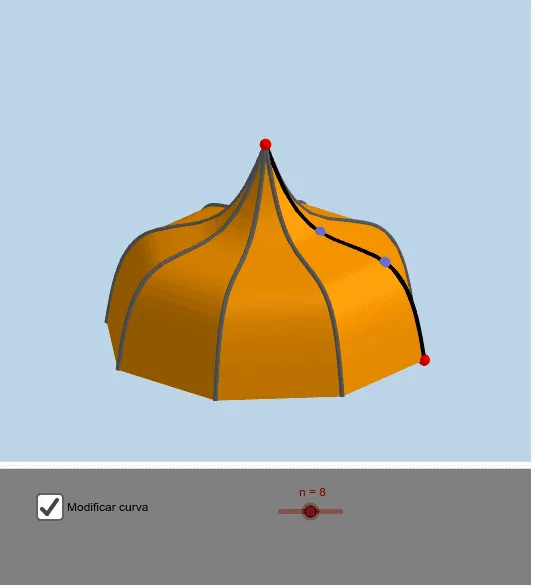
This example demonstrates a 3D solid figure named 'Dome 1', constructed by rotating a spline curve and generating a sequence of surfaces to form a dome-like or arched structure. The core mathematical concepts involve solid geometry, surfaces of revolution, parametric curves (splines), and the combination of sequences and transformations (rotation). Key construction steps include: using Plane to define a reference plane, Point and PointIn to set key points, Spline to create a smooth curve, Rotate to revolve the curve, Surface to generate the rotated surface, and Sequence to produce multiple rotated copies, along with buttons (botón1, botón3, botón5) for interactive control. This is suitable for high school or university students learning solid geometry, parametric surfaces, and dynamic geometry software, and can be used for mathematical visualization or exploring the generation of solids of revolution.
GeoGebra Commands & Parameters
Plane(y = 0) → aPoint(zAxis) → APointIn(a) → BPointIn(a) → CPoint(xAxis) → DSpline({A, B, C, D}, 3) → dRotate(d, (360 * ° / n), zAxis) → d'Surface((k * d(t)) + ((1 - k) * d'(t)), k, 0, 1, t, 0, 1) → eSequence(Rotate[e, ((i * 360) * ° / n)], i, 1, n) → lista_1Sequence(Rotate[d, ((i * 360) * ° / n)], i, 1, n - 1) → lista_2
AI Drawing Prompt Reference
Draw a 3D solid figure named 'Dome 1' by rotating a cubic spline curve connecting four key points, demonstrating the combination of rotated surfaces and sequences to form an arched structure. Start by defining a reference plane and placing four key points on it, then create a smooth spline curve through these points. Rotate the curve around the Z-axis to generate a surface of revolution, and use a sequence to produce multiple rotated copies of this surface, combining them to form the dome-like shape. Include interactive buttons to control the rotation angle and number of surfaces.
The prompt above was compiled from the original drawing commands and is for reference only.