
Distance Between Two Points - Interactive GeoGebra Example
Loading the math board and drawing, please wait…
In collections
Mathematics Form 2
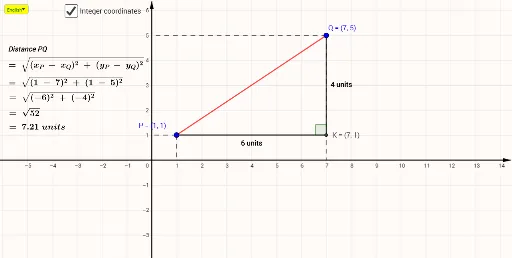
This example demonstrates how to visually derive and verify the distance formula between two points in a Cartesian plane using GeoGebra's geometric construction tools. Core mathematical concepts include: the distance formula (d = √[(x₂-x₁)² + (y₂-y₁)²]), the Pythagorean theorem as its geometric foundation, line segment length, slope, and angle of inclination. Construction details: define two draggable points P and Q with coordinate variables x_P, y_P, x_Q, y_Q; construct Segment PQ; draw a Circle centered at one point with radius equal to PQ to visualize distance; compute Midpoint M; display numerical distance via Length and Text; calculate Slope and Angle α of the segment; use If conditional logic for interactive feedback. The construction connects algebraic formulas with geometric intuition. Suitable for middle school to high school students studying analytic geometry, coordinate geometry, or Euclidean geometry foundations.
GeoGebra Commands & Parameters
Segment(P, Q) → fSlope(Line[P, Q]) → sIf(y(P) ≤ y(Q), P, Q) → MIf(y(P) ≤ y(Q), Q, P) → NLine(M, xAxis) → gLine(N, yAxis) → hIntersect(g, h) → KAngle(N, K, M) → αLine(N, xAxis) → jLine(M, yAxis) → kIntersect(j, yAxis) → CIntersect(h, xAxis) → DIntersect(k, xAxis) → EIntersect(g, yAxis) → FSegment(N, D) → lSegment(N, C) → mSegment(M, F) → nSegment(M, E) → pSegment(N, K) → qSegment(M, K) → rMidpoint(N, K) → ACircle(A, 0.5) → cLine(A, xAxis) → tIntersect(c, t) → G, HLength(r) → aLength(q) → bMidpoint(M, K) → BText(x(P)) → x_PText(y(P)) → y_PIf(x(Q) ≥ 0, Text[x(Q)], "(" + (Text[x(Q)]) + ")") → x_QIf(y(Q) ≥ 0, Text[y(Q)], "(" + (Text[y(Q)]) + ")") → y_QIf(Xv ≥ 0, Text[Xv], "(" + (Text[Xv]) + ")") → XtIf(Yv ≥ 0, Text[Yv], "(" + (Text[Yv]) + ")") → YtSelectedIndex(Bahasa) → nnIf(nn ≟ 1, "Distance PQ", "Jarak PQ") → text4If(nn ≟ 1, "units", "unit") → UTex
AI Drawing Prompt Reference
Create a Cartesian coordinate system and drag points P and Q to change their positions. Construct line segment PQ, calculate its slope and angle. Draw the midpoint M of PQ and a circle centered at M with radius PQ. Display the length of PQ and calculate its slope and angle. Construct auxiliary lines and intersections based on the positions of P and Q to help understand the distance formula and angle relationships.
The prompt above was compiled from the original drawing commands and is for reference only.