
Discriminant
Loading the math board and drawing, please wait…
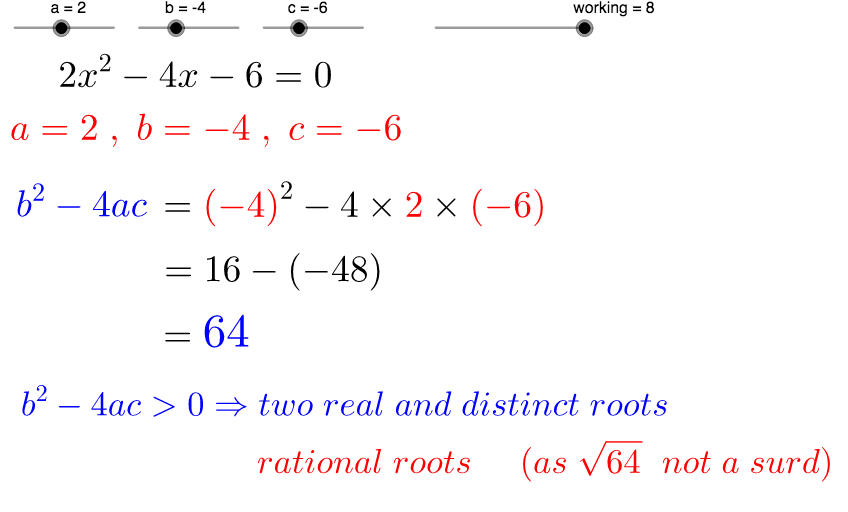
This example demonstrates the nature of roots of a quadratic equation. By adjusting coefficients a, b, and c, you can observe changes in the number and position of the roots. The main mathematical concepts involved are the discriminant of a quadratic equation. The construction uses if statements, intersection, and point commands in GeoGebra. Suitable for middle school and above students to learn the method of determining the roots of a quadratic equation.
GeoGebra Commands & Parameters
If(c < 0, "-", "+") → signccIf(c ≠ 0, signcc + absc, "") → text6If(b < 0, "-", "+") → signbbIf(a < 0, "-", "") → signaIf(a ≟ 0, "", If[absa ≟ 1, signa + "x^2", a + "x^2"]) → text5If(b ≟ 0, "", If[a ≠ 0 ∧ absb ≠ 1, signbb + absb + "x", signbb + "x"]) → text7If(b < 0, "-", "") → signbIf(c < 0, "-", "") → signcIf(a < 0, "-", "+") → signaaIf(b < 0, "(" + b + ")", "" + b) → text3If(c < 0, "(" + c + ")", "" + c) → text4If(a < 0, "(" + a + ")", "" + a) → text11Intersect(d, xAxis) → A, BPoint(e) → CPoint(e) → D_1Point(f) → EPoint(f) → F
AI Drawing Prompt Reference
Draw a graph of the roots of a quadratic equation, and observe how the number and position of the roots change by adjusting coefficients a, b, and c. First, draw the coefficient a for the quadratic term, then draw the coefficient b for the linear term, and finally draw the constant term c. Use if statements to determine the sign of the roots and draw their positions accordingly.
The prompt above was compiled from the original drawing commands and is for reference only.