
Discrete Fourier Transform: Trigonometric Interpolation
Loading the math board and drawing, please wait…
In collections
Discrete Fourier Transform
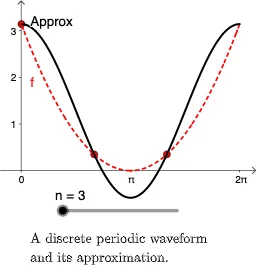
This example demonstrates the process of the Discrete Fourier Transform through different representations. It involves core concepts of complex numbers, trigonometry, and polynomial functions. GeoGebra commands used include Sequence, Zip, Length, Sum, Max, Plane, Point, Vector, etc. Suitable for university mathematics and signal processing courses.
GeoGebra Commands & Parameters
Sequence(((2 * π) * i / n), i, 0, n - 1) → SZip((s, f(s)), s, S) → PlotZip((f(k), 0), k, S) → LPLength(LP) → NSequence(N) → LNZip(Segment[(k, 0), (k, x(X))], k, Lk, X, LF) → FPRealZip(Segment[(k, 0), (k, y(X))], k, Lk, X, LF) → FPImgZip(Sum[Zip[(abs(P); arg(P) + (((2 * π) * k) * (n - 1) / N)), P, LF, n, LN]], k, Lk) → LCZip(If[0 ≤ x ≤ 6.283185307179586, (x(F) * sin((k * x))) + (y(F) * cos((k * x)))], F, LF, k, Lk) → fySum(fy) → poliMax(FPReal) → maxmMax(FPReal) → maxnPlane(A, B, C) → aZip(If[0 ≤ x ≤ 6.283185307179586, (x(F) * cos((k * x))) - (y(F) * sin((k * x)))], F, LF, k, Lk) → fxSum(fx) → polrPoint(yAxis) → DPoint(yAxis) → EVector(D, E) → uPoint(xAxis) → FPoint(xAxis) → GVector(F, G) → v
AI Drawing Prompt Reference
Illustrate the process of the Discrete Fourier Transform, involving complex numbers, trigonometry, and polynomial functions. Start by plotting a sequence of complex points, then generate real and imaginary part curves through trigonometric interpolation, followed by polynomial approximation curves. Include vectors on the coordinate axes. The final image should display the coordinate axes, complex points, interpolation curves, polynomial curves, and vectors, presented in order from basic to complex.
The prompt above was compiled from the original drawing commands and is for reference only.