
Exploring Conformal Mapping by Juan Carlos Ponce Campuzano
Loading the math board and drawing, please wait…
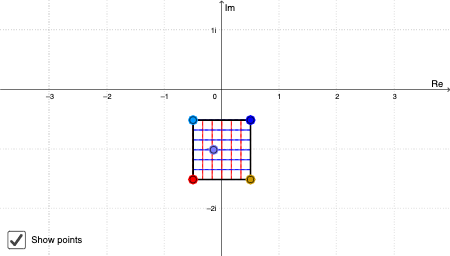
This example demonstrates the effects of conformal mappings in the complex plane, showcasing mapping properties through geometric transformations. It involves core mathematical concepts such as complex numbers, functions, line segments, rhombuses, similar triangles, difference and slope, and cones. The construction utilizes GeoGebra commands like Sequence, Point, Locus, Polygon, Centroid, Join, If, and LaTeX. Suitable for high school and above, helping learners understand the geometric significance and transformation properties of complex functions.
GeoGebra Commands & Parameters
Sequence(Segment[A + (i * (B - A) / a), C + (i * (D - C) / a)], i, 0, a) → list1Sequence(Segment[A + (i * (C - A) / a), B + (i * (D - B) / a)], i, 0, a) → list2Point(Element[list1, A1]) → B1Point(Element[list1, A2]) → B2Point(Element[list1, A3]) → B3Point(Element[list1, A4]) → B4Point(Element[list1, A5]) → B5Point(Element[list1, A6]) → B6Point(Element[list1, A7]) → B7Point(Element[list1, A8]) → B8Point(Element[list1, A9]) → B9Point(Element[list1, A10]) → B10Point(Element[list2, A1]) → C1Point(Element[list2, A2]) → C2Point(Element[list2, A3]) → C3Point(Element[list2, A4]) → C4Point(Element[list2, A5]) → C5Point(Element[list2, A6]) → C6Point(Element[list2, A7]) → C7Point(Element[list2, A8]) → C8Point(Element[list2, A9]) → C9Point(Element[list2, A10]) → C10Locus(D1, B1) → F1Locus(D2, B2) → F2Locus(D3, B3) → F3Locus(D4, B4) → F4Locus(D5, B5) → F5Locus(D6, B6) → F6Locus(D7, B7) → F7Locus(D8, B8) → F8Locus(D9, B9) → F9Locus(D10, B10) → F10Locus(E1, C1) → G1Locus(E2, C2) → G2Locus(E3, C3) → G3Locus(E4, C4) → G4Locus(E5, C5) → G5Locus(E6, C6) → G6Locus(E7, C7) → G7Locus(E8, C8) → G8Locus(E9, C9) → G9Locus(E10, C10) → G10Polygon(A, B, D, C) → poly1, a_1, b, d, cPoint(poly1) → ZLocus(Z', Z) → loc1Centroid(poly1) → OJoin({list1, list2}) → list3Point(list3) → EIf(4 ≤ Indexnames ≤ 6, unites, unitother) → ChooseunitLaTeX(Indexnames, true, true) → text3LaTeX(xmax, true, true) → text4LaTeX(xmin, true, true) → text5LaTeX(ymax, true, true) → text6LaTeX(ymin, true, true) → text7
AI Drawing Prompt Reference
This is a geometric figure demonstrating conformal mapping in the complex plane. It includes line segments, rhombuses, and similar triangles, showing mapping properties through geometric transformations. Key objects such as points, line segments, rhombuses, and triangles are connected and constructed to form the overall figure. The construction order starts with basic line segments, then adds rhombuses and triangles, and finally forms the complete structure.
The prompt above was compiled from the original drawing commands and is for reference only.