
Design & Adapt Games and Puzzles
Loading the math board and drawing, please wait…
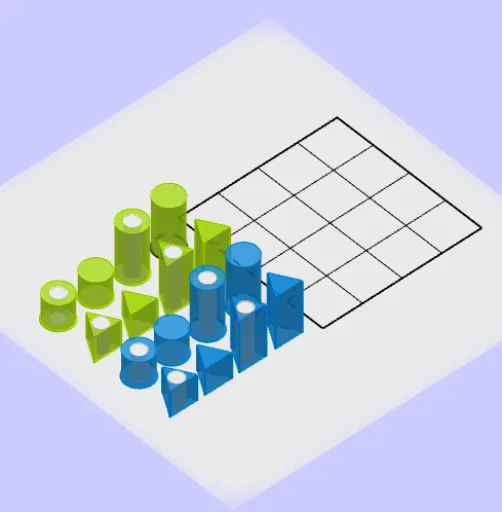
This example demonstrates how to use GeoGebra to design and adapt games and puzzles. It involves core mathematical concepts such as vectors, polygons, circles, and segments. Using commands like Circle, Point, Segment, and Polygon, users can create complex geometric shapes. Suitable for middle school and above students and teachers for teaching and self-study.
GeoGebra Commands & Parameters
Circle(G_1, 1) → cCircle(G_2, 1) → dCircle(G_3, 1) → eCircle(G_4, 1) → fPoint(Circle[E_1, 2]) → JSegment(E_1, J) → gPolygon(E_1, J, 3) → poly1, h, i, j, E_4Circle(G_1, 0.5) → qCircle(G_3, 0.5) → rSegment(F_3, G_{10}) → lSegment(H_3, I) → mPoint(Circle[M, 2]) → NSegment(M, N) → nPolygon(F_3, G_{10}, 3) → poly2, s, t, a, FPolygon(H_3, I, 3) → poly3, f_1, g_1, h_1, G_{11}Polygon(M, N, 3) → poly4, j_1, k_1, l_1, H_4Point(Circle[B_{21}, 12]) → B_{25}Segment(B_{21}, B_{25}) → n_1Polygon(B_{21}, B_{25}, 4) → poly5, p_1, q_1, r_1, s_1, B_5, B_1Midpoint(s_1) → B_{11}Midpoint(r_1) → B_3Midpoint(B_1, B_{11}) → B_6Midpoint(B_3, B_5) → B_4Midpoint(B_1, B_3) → B_2Midpoint(B_{11}, B_{21}) → B_{16}OrthogonalLine(B_6, s_1) → t_1OrthogonalLine(B_{11}, s_1) → a_1OrthogonalLine(B_{16}, s_1) → b_1OrthogonalLine(B_2, r_1) → d_1OrthogonalLine(B_3, r_1) → e_1OrthogonalLine(B_4, r_1) → f_2Intersect(d_1, n_1) → B_{22}Intersect(e_1, n_1) → B_{23}Intersect(f_2, n_1) → B_{24}Intersect(b_1, q_1) → B_{20}Intersect(t_1, q_1) → B_{10}Intersect(a_1, q_1) → B_{15}Segment(B_2, B_{22}) → g_2Segment(B_3, B_{23}) → h_2Segment(B_4, B_{24}) → i_2Segment(B_{16}, B_{20}) → j_2Segment(B_{11}, B_{15}) → k_2Segment(B_6, B_{10}) → l_2Circle(L_1, 1) → c_2Circle(L_2, 1) → d_2Circle(L_3, 1) → e_2Circle(L_4, 1) → p_2Point(Circle[S_1, 2]) → T_1Segment(S_1, T_1) → m_2Point(Circle[U_1, 2]) → V_1Segment(U_1, V_1) → n_2Point(Circle[W_1, 2]) → Z_1Segment(W_1, Z_1) → q_2Point(Circle[A_2, 2]) → B_8Segment(A_2, B_8) → r_2Polygon(S_1, T_1, 3) → poly6, s_2, t_2, a_2, APolygon(U_1, V_1, 3) → poly7, f_3, g_3, h_3, WPolygon(W_1, Z_1, 3) → poly8, b_2, j_3, k_3, BPolygon(A_2, B_8, 3) → poly9, n_3, p_3, q_3, VCircle(L_1, 0.5) → d_3Circle(L_3, 0.5) → e_3Point(Circle[O_1, 3]) → P_1Segment(O_1, P_1) → t_3Polygon(O_1, P_1, 4) → poly10, a_3, b_3, f_4, g_4, Q_1, R_1PointIn(poly10) → M_2Cylinder(q, 2) → u, c_4, vCylinder(c, 2) → w, d_4, o_1Cylinder(d, 2) → u_1, e_4, v_1Cylinder(r, 4) → w_2, k_4, o_3Cylinder(e, 4) → u_3, p_4, v_3Cylinder(f, 4) → j_4, r_4, l_4Cylinder(p_2, 4) → n_4, s_4, o_4Cylinder(e_3, 4) → t_4, c_5, u_4Cylinder(e_2, 4) → v_4, d_5, w_4Cylinder(d_2, 2) → g_5, h_5, i_5Cylinder(d_3, 2) → k_5, p_5, l_5Cylinder(c_2, 2) → m_5, q_5, n_5Plane(xAxis, yAxis) → v_5Prism(poly4, 4) → m_1, S, edge27, edgeST, edge29, edge28, T, K_1, faceMNTS, face21, face20, face19, edgeMS, edgeNTLineBisector(f_1) → i_1LineBisector(g_1) → c_1Intersect(i_1, c_1) → G_7Circle(G_7, 0.5) → q_4Cylinder(q_4, 4) → w_3, c_6, a_4Prism(poly3, 4) → b_4, R, edge21, edge22, edge24, edge23, G_9, H_1, face15, face17, face16, face14, edge19, edge20LineBisector(j_1) → i_4LineBisector(k_1) → f_6Intersect(i_4, f_6) → G_8Prism(poly2, 2) → b, O, edgeFQ, edgeOP, edgePQ, edgeOQ, P, Q, face6, face8, face7, faceOPQ, edge9, edge10LineBisector(i) → kLineBisector(h) → pIntersect(k, p) → G_5Circle(G_5, 0.5) → h_4Cylinder(h_4, 2) → w_1, d_6, o_2Prism(poly1, 2) → u_2, K, edge12, edgeKL, edgeLU, edgeKU, L, U, face9, face11, face10, faceKLU, edge11, edgeJLPrism(poly9, 4) → v_2, Z, edge15, edge16, edge18, edge17, A_1, C_1, face13, face22, face18, face12, edge13, edge14Prism(poly7, 2) → i_3, D_1, edge30, edge31, edge33, edge32, F_1, I_1, face24, face26, face25, face23, edge25, edge26LineBisector(f_3) → r_3LineBisector(g_3) → m_4Intersect(r_3, m_4) → L_6LineBisector(s) → j_5LineBisector(t) → g_6Intersect(j_5, g_6) → G_6LineBisector(n_3) → h_6LineBisector(p_3) → i_6Intersect(h_6, i_6) → L_8LineBisector(s_2) → l_3LineBisector(t_2) → m_3Intersect(l_3, m_3) → L_5LineBisector(b_2) → s_3LineBisector(j_3) → c_3Intersect(s_3, c_3) → L_7Circle(L_5, 0.5) → e_5Circle(L_7, 0.5) → f_5Cylinder(e_5, 2) → a_5, r_5, b_5Prism(poly6, 2) → o_5, C, edgeAE, edgeCD, edgeDE, edgeCE, D, E, face27, face29, face28, faceCDE, edge34, edge35Cylinder(f_5, 4) → s_5, t_5, u_5Prism(poly8, 4) → w_5, G, edge38, edgeGH, edge40, edge39, H, J_1, face31, face33, face32, face30, edge36, edge37