
Derivatives (Intro)-1: Dynamic Geometric Illustrator of Derivative at a Point
Loading the math board and drawing, please wait…
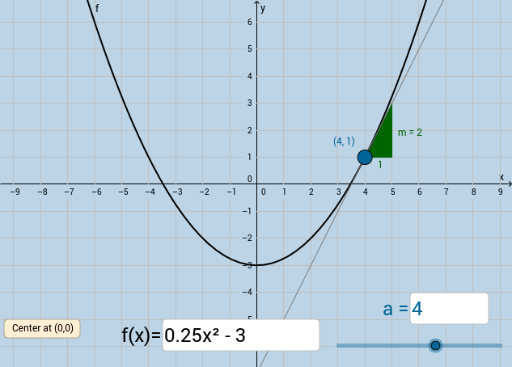
This GeoGebra example dynamically illustrates the derivative of a function at a specific point, showing the tangent line and its slope as the geometric interpretation of the instantaneous rate of change. It emphasizes the transition from secant lines to the tangent line, and how the slope value changes as the point moves along the curve. The construction uses GeoGebra commands such as Tangent to draw the tangent line at point A, Slope to compute its slope, Textfield and InputBox for interactive input of coordinates or function expressions, Intersect to find intersection points, and a button to trigger dynamic animations. Objects include the function f, point A, tangent line g, slope m, input boxes, button1, derivative function f', and auxiliary points h and B. This resource is ideal for high school or introductory college calculus students learning the definition of the derivative, tangent slopes, and local linear approximation, and serves as an effective classroom demonstration tool.
GeoGebra Commands & Parameters
Tangent(A, f) → gSlope(g) → mTextfield(f) → InputBox1Textfield(a) → InputBox2Intersect(f', h, (4, 2)) → B