
First-Order Approximation Zoom: Local Linearization Explorer
Loading the math board and drawing, please wait…
In collections
MATH1052-edX
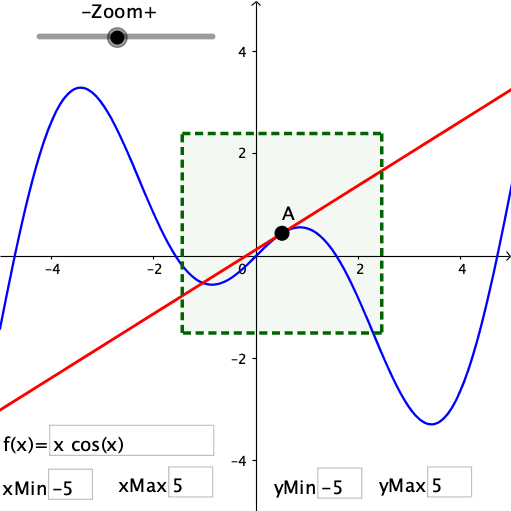
① This GeoGebra example visualizes how the first-order Taylor approximation (tangent line) of a function matches the original curve near a selected point, with interactive zoom controls to explore the concept of local linearity. ② Core mathematical concepts include derivatives, tangent lines, first-order Taylor polynomials, local linear approximation, and the behavior of functions in small neighborhoods. ③ Construction highlights: using commands like Point, Polygon, TaylorSeries, and Textfield, the applet builds function f, point A, zoom object, auxiliary points C1-C4, polygon poly1, tangent line TanLine, secant toggle togSecant, input boxes for parameters, and sliders to adjust the viewing window (xMin/xMax/yMin/yMax). ④ This is ideal for high school or introductory college calculus courses to demonstrate the geometric meaning of derivatives and the idea of linearization, and can be used for interactive student exploration.
GeoGebra Commands & Parameters
Point(f) → APolygon(C1, C2, C3, C4) → poly1, c1, c2, c3, c4TaylorSeries(f, x(A), 1) → TanLineTextfield(xMin) → inputBox1Textfield(xMax) → inputBox2Textfield(yMax) → inputBox3Textfield(yMin) → inputBox4Textfield(f) → inputBox5
AI Drawing Prompt Reference
Draw a graph showing the first-order approximation of a function. Select a point on the function, draw the tangent line at that point, and show how the function curve matches the tangent line near the point. Use sliders to adjust the view range and add input boxes for parameters. The graph should include the tangent line, function curve, auxiliary points, and text labels to help understand the concept of local linearization.
The prompt above was compiled from the original drawing commands and is for reference only.