
Euler's Method: General Exploration
Loading the math board and drawing, please wait…
In collections
MATH1052-edX
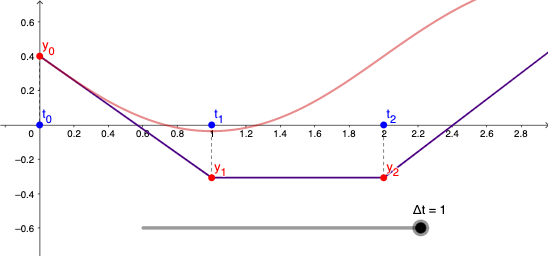
① This GeoGebra example dynamically demonstrates Euler's method for approximating solutions to first-order ordinary differential equations, showing how the numerical solution approaches the exact solution. ② Core mathematical concepts include differential equations, numerical integration, tangent-line approximation, the influence of step size (Δt) on error, and the discretization of solution curves. ③ Construction highlights: the SolveODE command computes exact or reference solutions; Zip, Join, PolyLine, and Segment commands build the polygonal approximation path; objects include a button (button1) for animation control, a slider Δt, and numerous point objects (T0 to T36) representing iteration nodes. ④ Suitable for high school to university-level calculus or numerical analysis courses, this tool helps students intuitively grasp the principles of numerical methods, convergence, and error analysis, and serves as an interactive demonstration for teachers or self-study.
GeoGebra Commands & Parameters
SolveODE(f, T0, Y0, 3, 0.001) → solZip("y_{" + ((k * "}")), k, 0…n) → TZip("t_{" + ((k * "}")), k, 0…n) → UJoin({{P0}, P1:P200}) → SLPolyLine(SL) → appxSegment(P0, X0) → S0Segment(P1, X1) → S1Segment(P2, X2) → S2Segment(P3, X3) → S3Segment(P4, X4) → S4Segment(P5, X5) → S5Segment(P6, X6) → S6Segment(P7, X7) → S7Segment(P8, X8) → S8Segment(P9, X9) → S9Segment(P10, X10) → S10Segment(P11, X11) → S11Segment(P12, X12) → S12Segment(P13, X13) → S13Segment(P14, X14) → S14Segment(P15, X15) → S15Segment(P16, X16) → S16Segment(P17, X17) → S17Segment(P18, X18) → S18Segment(P19, X19) → S19Segment(P20, X20) → S20Segment(P21, X21) → S21Segment(P22, X22) → S22Segment(P23, X23) → S23Segment(P24, X24) → S24Segment(P25, X25) → S25Segment(P26, X26) → S26Segment(P27, X27) → S27Segment(P28, X28) → S28Segment(P29, X29) → S29Segment(P30, X30) → S30Segment(P31, X31) → S31Segment(P32, X32) → S32Segment(P33, X33) → S33Segment(P34, X34) → S34Segment(P35, X35) → S35Segment(P36, X36) → S36Segment(P37, X37) → S37Segment(P38, X38) → S38Segment(P39, X39) → S39Segment(P40, X40) → S40Segment(P41, X41) → S41Segment(P42, X42) → S42Segment(P43, X43) → S43Segment(P44, X44) → S44Segment(P45, X45) → S45Segment(P46, X46) → S46Segment(P47, X47) → S47Segment(P48, X48) → S48Segment(P49, X49) → S49Segment(P50, X50) → S50Segment(P51, X51) → S51
AI Drawing Prompt Reference
Create a dynamic illustration showing Euler's method approximating solutions to first-order ordinary differential equations, with the numerical solution approaching the exact one. Include the exact solution curve and a polygonal path for the numerical solution, with a slider to adjust step size Δt and observe error changes. Key elements are initial points, iteration nodes, tangent line segments, and an animation control button. Construct by first computing the exact solution, then forming the numerical path, and finally adding interactive controls.
The prompt above was compiled from the original drawing commands and is for reference only.