
Exploring Errors in Euler's Method: Visualizing Numerical vs. Exact Solutions
Loading the math board and drawing, please wait…
In collections
MATH1052-edX
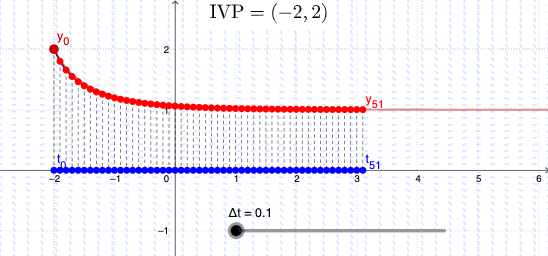
① This GeoGebra example dynamically demonstrates how Euler's method approximates solutions to ordinary differential equations, highlighting the accumulation of error as the step size Δt varies, and comparing the numerical polygonal path with the exact solution curve. ② Core mathematical concepts include initial value problems, Euler's method, local and global truncation errors, step-size dependence, and the geometric interpretation of slope fields (direction fields). ③ Construction details: The slope field is generated using the SlopeField command, the exact solution is obtained via SolveODE, and the Euler polygonal approximation is built using Zip, Join, PolyLine, and Segment commands. A slider (object Δt) controls the step size, a button (button1) resets or animates the process, and objects T0 through T36 represent iteration points or error indicators, enabling dynamic visualization of error growth. ④ This resource is suitable for university-level numerical analysis or differential equations courses, as well as advanced high school calculus, and serves as an interactive tool for instructors and students to explore the behavior of numerical methods.
GeoGebra Commands & Parameters
Zip("y_{" + ((k * "}")), k, 0…n) → TZip("t_{" + ((k * "}")), k, 0…n) → UJoin({{P0}, P1:P50}) → SLPolyLine(SL) → appxSegment(P0, X0) → S0Segment(P1, X1) → S1Segment(P2, X2) → S2Segment(P3, X3) → S3Segment(P4, X4) → S4Segment(P5, X5) → S5Segment(P6, X6) → S6Segment(P7, X7) → S7Segment(P8, X8) → S8Segment(P9, X9) → S9Segment(P10, X10) → S10Segment(P11, X11) → S11Segment(P12, X12) → S12Segment(P13, X13) → S13Segment(P14, X14) → S14Segment(P15, X15) → S15Segment(P16, X16) → S16Segment(P17, X17) → S17Segment(P18, X18) → S18Segment(P19, X19) → S19Segment(P20, X20) → S20Segment(P21, X21) → S21Segment(P22, X22) → S22Segment(P23, X23) → S23Segment(P24, X24) → S24Segment(P25, X25) → S25Segment(P26, X26) → S26Segment(P27, X27) → S27Segment(P28, X28) → S28Segment(P29, X29) → S29Segment(P30, X30) → S30Segment(P31, X31) → S31Segment(P32, X32) → S32Segment(P33, X33) → S33Segment(P34, X34) → S34Segment(P35, X35) → S35Segment(P36, X36) → S36Segment(P37, X37) → S37Segment(P38, X38) → S38Segment(P39, X39) → S39Segment(P40, X40) → S40Segment(P41, X41) → S41Segment(P42, X42) → S42Segment(P43, X43) → S43Segment(P44, X44) → S44Segment(P45, X45) → S45Segment(P46, X46) → S46Segment(P47, X47) → S47Segment(P48, X48) → S48Segment(P49, X49) → S49Segment(P50, X50) → S50Segment(P51, X51) → S51SlopeField(f) → slopefield1SolveODE(f, T0, Y0, 8, 0.001) → sol
AI Drawing Prompt Reference
Draw a comparison between the numerical solution and the exact solution using Euler's method. First, generate the slope field, then calculate the numerical solution path using Euler's method with step size Δt to control error accumulation. Plot the exact solution curve and the numerical solution path, use segments to represent error at each iteration point, and dynamically show how error grows with step size changes.
The prompt above was compiled from the original drawing commands and is for reference only.