
Derivative of Sine & Cosine Functions (Quick Investigation)
Loading the math board and drawing, please wait…
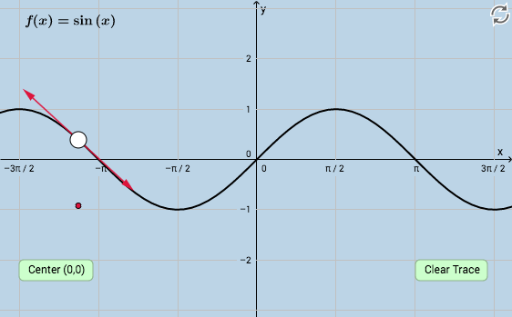
This example provides an intuitive and interactive way to discover the derivatives of sine and cosine functions. By constructing the graphs of sine and cosine functions and their tangents at certain points, students can visually understand the concept of derivatives. GeoGebra commands used include Point, Circle, Tangent, Intersect, and Vector. Suitable for high school mathematics education, this example helps students better understand basic calculus concepts.
GeoGebra Commands & Parameters
Point(f) → ACircle(A, 1.5) → cTangent(A, f) → gIntersect(c, g, 2) → BIntersect(c, g, 1) → CVector(A, B) → uVector(A, C) → v
AI Drawing Prompt Reference
Draw the graphs of sine and cosine functions. Pick a point on one of the curves and draw a small circle centered at that point. Construct the tangent line to the curve at that point, and let it intersect the circle at two points. From the center point, draw two vectors pointing to these two intersection points, creating opposite arrows. This setup visually illustrates the derivative concept by showing how the tangent line relates to the curve at a specific location. Include the function curves, the circle, the tangent line, and the two vectors in a clear layout suitable for teaching.
The prompt above was compiled from the original drawing commands and is for reference only.