
Dependence of Vertex Average Distance on Truncation Parameter in a Truncated Oct
Loading the math board and drawing, please wait…
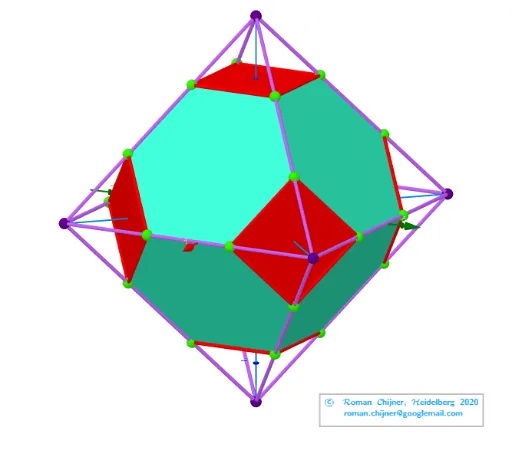
This example demonstrates the relationship between the average distance of vertices and the truncation parameter in a truncated octahedron. Key mathematical concepts include solid geometry, optimization, and parametric equations. The construction utilizes GeoGebra commands/objects such as Join, Unique, Length, Text, Sum, Sphere, Ray, Zip, UnicodeToLetter, and TableText. Suitable for high school and above, it serves as a teaching tool for solid geometry and optimization problems.
GeoGebra Commands & Parameters
Join(Zip[lP0(x(a)) + ((lP0(y(a)) - lP0(x(a))) * {t, 1 - t}), a, segN]) → lVVUnique(lVV) → lP'Length(lP') → nLength(lVV(1)) → R2Text("" + p3) → txt_pSum(Flatten[Sequence[Append[Sequence[Element[txt_p, i], i, m1(k), m2(k)], " "], k, 1, 5]]) → txtUm1Sphere(O, R1) → sp1Sphere(O, R2) → sp2Ray(B, AA) → hZip(Polygon[a], a, v_poly06) → poly06Zip(Polygon[a], a, v_poly05) → poly05Text(text12, C, false, true) → text8Zip(Segment[lP0(x(a)), lP0(y(a))], a, segN1) → seg1Zip(Segment[lP0(x(a)), lP0(y(a))], a, segN2) → seg2UnicodeToLetter(34) → u34Zip(Segment[lVV(x(a)), lVV(y(a))], a, segNΔ6) → segΔ6Zip(Segment[lVV(x(a)), lVV(y(a))], a, segNΔ4) → segΔ4TableText(Append["\;\;\; \fgcolor{#848482}{4-gons}", segΔ4], Append["\;\;\; \fgcolor{#007FFF}{6-gons}", segΔ6], "v") → text3a
AI Drawing Prompt Reference
Create a visual representation of a truncated octahedron, illustrating the relationship between the average vertex distance and the truncation parameter. Construct the vertices and edges of the truncated octahedron, calculate the average vertex distance, and highlight the faces as quadrilaterals and hexagons in different colors. Draw concentric spheres to represent the inner and outer radii, and add text annotations for parameter values. Finally, use rays and line segments to connect key points, completing the overall structure.
The prompt above was compiled from the original drawing commands and is for reference only.