
Demo of New 3D Curve Features in GeoGebra 5.0.26.0
Loading the math board and drawing, please wait…
In collections
My 3D Collection
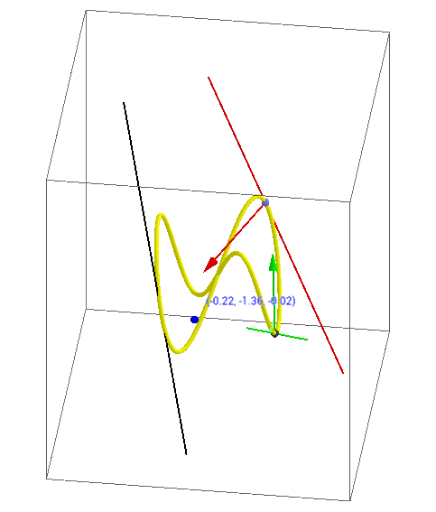
This example demonstrates the new 3D curve features in GeoGebra 5.0.26.0. It involves the construction of curves in coordinate geometry, showing how to use commands like CurveCartesian, Derivative, Point, Tangent, CurvatureVector, and Curvature to draw and analyze 3D curves. Suitable for high school and above students and teachers, it helps in understanding the geometric properties and calculus concepts of curves.
GeoGebra Commands & Parameters
CurveCartesian(sin(t), sin((2 * t)), sin((3 * t)), t, 0, 6.283185307179586) → aCurveCartesian(sin(t), cos((2 * t)), t, 0, 6.283185307179586) → bDerivative(a) → a'Point(a) → ATangent(A, a) → cTangent(B, a) → dTangent(C, a) → fCurvatureVector(A, a) → cv_1CurvatureVector(C, a) → cvCurvature(A, a) → k_1Curvature(C, a) → k
AI Drawing Prompt Reference
Draw a 3D curve defined by the parametric equations sin(t), sin(2t), sin(3t) from t=0 to t=2π. Then draw another curve with parametric equations sin(t), cos(2t) from t=0 to t=2π. Compute the derivative of the first curve, find point A on the curve, and draw the tangent at point A. Also draw tangents at points B and C on the curve, and calculate the curvature vectors and curvatures at points A and C.
The prompt above was compiled from the original drawing commands and is for reference only.