
Deformations of a Solid: Interactive 3D Geometric Morphing
Loading the math board and drawing, please wait…
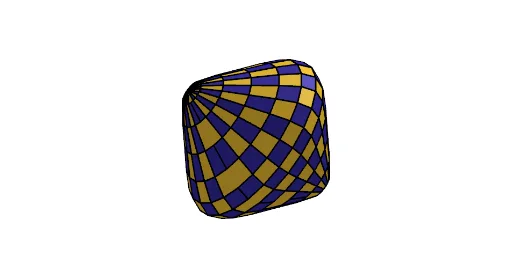
This GeoGebra example demonstrates the continuous deformation of a three-dimensional solid (such as a sphere) under parametric control, using sliders and buttons to animate the shape from its initial form into complex variations like twisting, expansion, or contraction. The core mathematical concepts involve solid geometry, differential geometry (curvature and deformation), and algebraic parameterization through variables like α, β, n, and others. The construction uses GeoGebra commands Join and Sequence to generate point sets and segments, building the deformation framework. Key objects include parameters a, m, Form, A, β, α, n, RR, Speed, e, h, along with lists liste1 through liste4 storing critical points or loci, and images image1/image2 with buttons Bouton1/Bouton2 to control animation and reset. This resource is suitable for high school to university-level mathematics instruction, particularly in solid geometry, differential geometry, or computer-aided geometry, helping students grasp the mathematical essence of parametric deformation and dynamic geometric transformation.
GeoGebra Commands & Parameters
Join(Sequence[Sequence[A + (((((α + β) * cos(t)) - (Form * cos(((α / β + 1) * t)))) * cos(j + a)), ((α + β) * sin(t)) - (Form * sin(((α / β + 1) * t))), ((((α + β) * cos(t)) - (Form * cos(((α / β + 1) * t)))) * sin(j + a))), t, 0, 6.28319, π / m], j, 0, π, π / m]) → liste3Sequence(Polygon[Element[liste3, i], Element[liste3, i + 1], Element[liste3, i + 1 + e], Element[liste3, i + e]], i, 1, Length[liste3], h) → liste4Sequence(Polygon[Element[liste3, i], Element[liste3, i + 1], Element[liste3, i + 1 + e], Element[liste3, i + e]], i, 1, Length[liste3], 2) → liste1Sequence(Polygon[Element[liste3, i], Element[liste3, i + 1], Element[liste3, i + 1 + e], Element[liste3, i + e]], i, 1, Length[liste3], 1) → liste2
AI Drawing Prompt Reference
Create a 3D solid shape that continuously deforms under parametric control, starting from a sphere-like form. The surface is built from multiple rings of points, each ring evenly spaced, connected by quadrilateral facets to form a smooth mesh. Sliders adjust deformation intensity, twist angle, and mesh resolution. Animate the shape to morph between original and complex variations, with buttons to play and reset the animation.
The prompt above was compiled from the original drawing commands and is for reference only.