
Defining Trigonometric Ratios by Mathguru
Loading the math board and drawing, please wait…
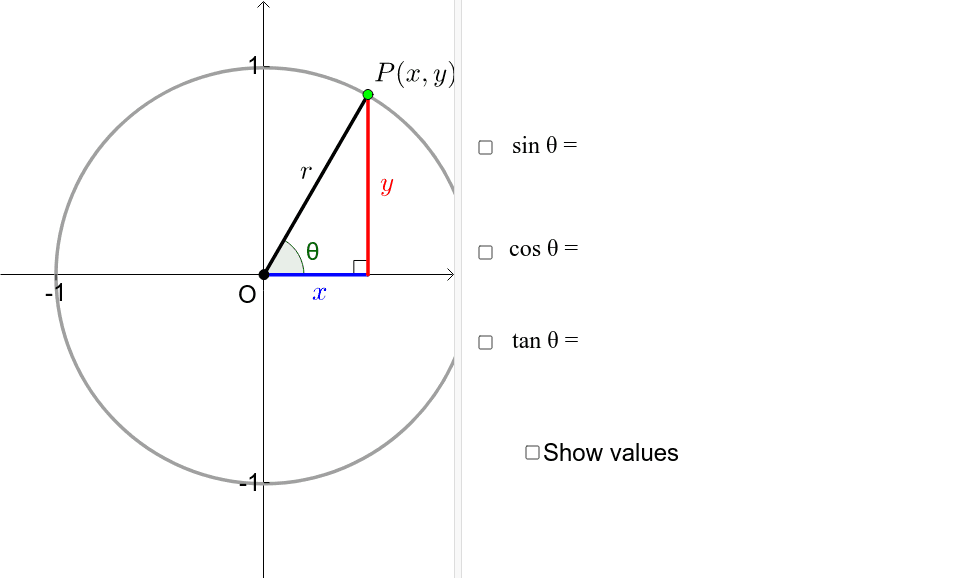
This GeoGebra example demonstrates how to define trigonometric ratios using the unit circle. It covers core mathematical concepts such as trigonometric functions (sine, cosine, etc.), the properties of the unit circle, angle measurement, and ratio relationships. The construction involves GeoGebra commands including Sequence for generating sequences, Point and Angle for creating points and angles, Circle for drawing the unit circle, and Segment and Midpoint for constructing segments and midpoints, providing a dynamic visualization of trigonometric ratios. This resource is ideal for high school mathematics education, particularly for introducing trigonometry concepts.
GeoGebra Commands & Parameters
Sequence(Rotate[(r, 0), k°, (0, 0)], k, 0, 360) → list1Point(list1) → PAngle((1, 0), (0, 0), P) → θCircle((0, -0.004807882852143508), r) → cSegment((0, 0), P) → aSegment((0, 0), (x(P), 0)) → bSegment(P, (x(P), 0)) → dMidpoint(b) → AMidpoint(d) → BMidpoint(a) → CSegment(E, E - (0, 0.025)) → iSegment(F, F - (0, 0.025)) → jSegment(G, G + (0.025, 0)) → kSegment(H, H + (0.025, 0)) → lAngle(P, (x(P), 0), (0, 0)) → αSequence(Rotate[(r, 0), k°, (0, 0)], k, 0, 360) → list1_1Point(list1_1) → P_1
AI Drawing Prompt Reference
Draw a unit circle and mark a point P on it. Calculate the angles θ and α between point P and the points (1,0) and the origin. Construct line segments a, b, and d connecting the origin to P, to (x(P),0), and from P to (x(P),0). Find the midpoints of these segments to get points A, B, and C. The overall presentation shows the relationship between the unit circle, angles, and line segments, suitable for mathematical education.
The prompt above was compiled from the original drawing commands and is for reference only.