
Dandelin Spheres Demo
Loading the math board and drawing, please wait…
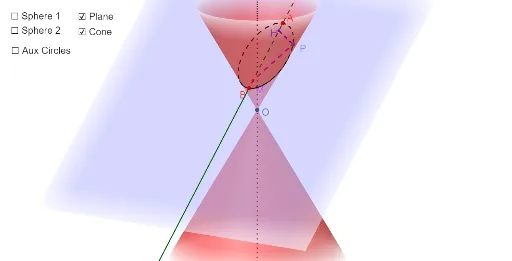
This example demonstrates how Dandelin Spheres reveal the geometric connection between conic sections (ellipse, parabola, hyperbola) and the curves studied in plane geometry. Key concepts include cone, section, sphere, angle bisector, intersection, and vector. Construction uses GeoGebra commands like InfiniteCone, Sphere, IntersectPath, and Vector. Suitable for high school students and math enthusiasts exploring conic properties and geometric intuition.
GeoGebra Commands & Parameters
InfiniteCone((0, 0, 0), zAxis, α) → aAxes(a) → d, e, fRotate(f, (-α), yAxis) → f'_1Point(f'_1) → ARotate(f, α, yAxis) → f'Point(f') → BPlane(A, B_1, B) → bIntersectPath(b, a) → cAxes(c) → i, jAngularBisector(f', i) → b2, b1Center(a) → OVector(O, B) → vOBAngle(Vector[A, B], Vector[A, O]) → βVector(O, A) → vOARotate(vOA, β / 2, A, k) → vOA'Angle(Vector[B, A], Vector[O, B]) → α1Rotate(vOB, α1 / 2, B, k) → vOB'Ray(B, B') → gIntersect(f, b1) → CenterSphere1OrthogonalLine(CenterSphere1, i, k) → hIntersect(i, h) → HCircle(CenterSphere1, H, k) → pSphere(CenterSphere1, H) → lRay(A, A') → mIntersect(f, b2) → CenterSphere2OrthogonalLine(CenterSphere2, i, k) → nIntersect(i, n) → MCircle(CenterSphere2, M, k) → sPoint(c) → PLine(O, P) → a_1Segment(M, P) → b_1Segment(P, H) → e_1Sphere(CenterSphere2, M) → l'OrthogonalLine(CenterSphere2, f'_1, k) → qOrthogonalLine(CenterSphere1, f'_1, k) → rIntersect(f'_1, r) → CIntersect(q, f'_1) → DCircle(f, C) → tangentCircle1Circle(f, D) → tangentCircle2Line(O, P) → d_1Intersect(d_1, tangentCircle2) → TangencyP2,Intersect(d_1, tangentCircle1) → TangencyP1,Segment(P, TangencyP1) → PtoTangent1Segment(TangencyP2, P) → PtoTangent2Segment(O, TangencyP2) → coneEdge
AI Drawing Prompt Reference
Draw a double cone with a cross-section to form a hyperbola, demonstrating how two inscribed spheres reveal the geometric connection between the cone's section and the hyperbola. Include key elements like the cross-section, spheres, angle bisectors, intersection points, and vectors. Label the centers of the spheres and points of tangency, constructing the cone, cross-section, spheres, and tangents in sequence, then connect key points to complete the figure.
The prompt above was compiled from the original drawing commands and is for reference only.