
Dandelin Spheres and Parabola
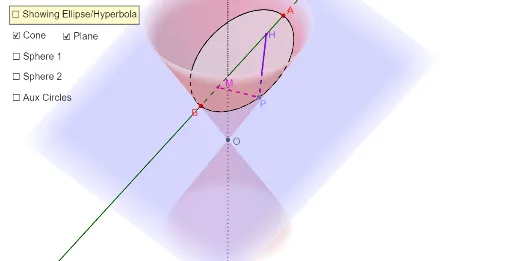
Loading the math board and drawing, please wait…
This example demonstrates how Dandelin spheres explain why geometrically defined parabola, ellipse, and hyperbola are the same curves as conic sections. It involves core concepts like conic sections, Dandelin spheres, geometric definitions, and cone sections. Construction uses GeoGebra commands such as InfiniteCone, Rotate, IntersectPath, Circle, and Sphere. Suitable for high school students and educators seeking a deeper geometric understanding of conic sections.
GeoGebra Commands & Parameters
InfiniteCone((0, 0, 0), zAxis, α) → aAxes(a) → d, e, fRotate(f, (-α), yAxis) → lineOAPoint(lineOA) → ARotate(f, α, yAxis) → f'Point(f') → BPlane(A, B_1, B) → bIntersectPath(b, a) → EllipseHyperbolaAxes(EllipseHyperbola) → i, jAngularBisector(f', i) → b2, b1Center(a) → OVector(O, B) → vOBAngle(Vector[A, B], Vector[A, O]) → βVector(O, A) → vOARotate(vOA, β / 2, A, k) → vOA'Angle(Vector[B, A], Vector[O, B]) → α1Rotate(vOB, α1 / 2, B, k) → vOB'Ray(B, B') → gIntersect(f, b1) → CenterSphere1OrthogonalLine(CenterSphere1, i, k) → hIntersect(i, h) → HCircle(CenterSphere1, H, k) → pSphere(CenterSphere1, H) → lRay(A, A') → mIntersect(f, b2) → CenterSphere2OrthogonalLine(CenterSphere2, i, k) → nIntersect(i, n) → MCircle(CenterSphere2, M, k) → sPoint(EllipseHyperbola) → PLine(O, P) → a_1Segment(M, P) → b_1Segment(P, H) → e_1Sphere(CenterSphere2, M) → l'OrthogonalLine(CenterSphere2, lineOA, k) → qOrthogonalLine(CenterSphere1, lineOA, k) → rIntersect(lineOA, r) → CIntersect(q, lineOA) → DCircle(f, C) → tangentCircle1Circle(f, D) → tangentCircle2Line(O, P) → lineOPIntersect(lineOP, tangentCircle2) → TangencyP2,Intersect(lineOP, tangentCircle1) → TangencyP1,Segment(P, TangencyP1) → PtoTangent1Segment(TangencyP2, P) → PtoTangent2Segment(O, TangencyP2) → coneEdgeTangent(A, EllipseHyperbola) → t,Plane(t, lineOA) → tangentToConePlanePlane(B, tangentToConePlane) → planeForParabolaIntersectPath(planeForParabola, a) → ParabolaIntersect(f, Parabola) → E,Intersect(f, planeForParabola) → F_1Line(B, F_1) → cAngularBisector(f', c) → f_1, g_1Intersect(g_1, f) → C_{SphereForParabola}OrthogonalLine(C_{SphereForParabola}, c, space) → h_1Intersect(h_1, c) → FSphere(C_{SphereForParabola}, F) → oPoint(Parabola) → GSegment(F, G) → i_1Intersect(f', o) → I, JCircle(f, I) → c_1Sphere(B, F) → uIntersect(c, u) → K, LOrthogonalPlane(K, c) → p_1IntersectPath(p_1, planeForParabola) → directrixOrthogonalLine(G, p_1) → k_1Intersect(directrix, Parabola) → N, TIntersect(directrix, k_1) → QSegment(G, O) → l_1Intersect(l_1, c_1, 1) → RPlane(c_1) → tangentCirclePlaneForParabolaOrthogonalLine(G, tangentCirclePlaneForParabola) → m_1Intersect(m_1, tangentCirclePlaneForParabola) → SAngle(S, G, R) → γAngle(Q, G, S) → δSegment(G, R) → j_1Segment(Q, G) → n_1Segment(Q, S) → q_1Segment(S, R) → r_1Angle(G, S, Q) → εAngle(R, S, G) → ζIf(checkBoxEllHyp, checkBoxParabola + (0 * z) = false) → p_2If(checkBoxEllHyp, checkBoxParabola + (0 * z) = false) → q_2If(checkBoxEllHyp, checkBoxParabola + (0 * z) = false) → r_2If(checkBoxEllHyp, checkBoxParabola + (0 * z) = false) → p_3If(checkBoxEllHyp, checkBoxParabola + (0 * z) = false) → q_3If(checkBoxEllHyp, checkBoxParabola + (0 * z) = false) → r_3If(checkBoxEllHyp, checkBoxParabola + (0 * z) = false) → p_4If(checkBoxEllHyp, checkBoxParabola + (0 * z) = false) → q_4If(checkBoxEllHyp, checkBoxParabola + (0 * z) = false) → r_4If(checkBoxEllHyp, checkBoxParabola + (0 * z) = false) → p_5If(checkBoxEllHyp, checkBoxParabola + (0 * z) = false) → q_5Angle(G, Q, K) → η
AI Drawing Prompt Reference
Draw a cone with a rotating line to create a conic section. Show two Dandelin spheres tangent to the curve at two and one point respectively. Label the cone's vertex, points on the curve, tangent points, and centers of the Dandelin spheres. Draw the spherical surfaces tangent to the curve. Finally, connect the vertex to a point on the curve to form a line.
The prompt above was compiled from the original drawing commands and is for reference only.