
Dürer's Perspective of a Prism
Loading the math board and drawing, please wait…
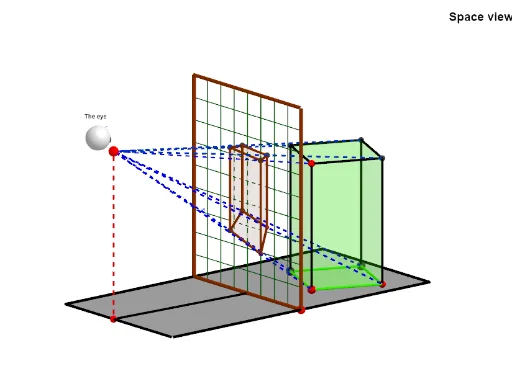
This example demonstrates Dürer's perspective of a prism. Key mathematical concepts include geometry, prisms, and perspective. Using GeoGebra commands such as Mirror, Polygon, PointIn, etc., the perspective of a prism can be constructed. Suitable for middle school and above students to learn about geometric perspective and solid geometry.
GeoGebra Commands & Parameters
Mirror(B, A) → B'Mirror(D, A) → D'Polygon(D', B', D, B) → poly1, d', b', d, b_1PointIn(poly1) → NPointIn(poly1) → LPolygon(L, N, 4, xOyPlane) → poly2, k, l, m, n, M, B_1Point(b') → ESegment(E, O) → fPoint(f) → PLine(L, zAxis) → r_4Intersect(xAxis, yAxis) → E_1Mirror(F_1, yAxis) → G_1Mirror(FF, yAxis) → FF'Polygon(FF', FF, F_1, G_1) → poly5, ff', ff, f_2, g_2Midpoint(d) → FSegment(F, D) → cPoint(c) → GLine(G, b') → eIntersect(e, d') → HPolygon(R, Q, H, G) → poly3, r, q, h, gSegment(L, E) → tIntersect(t, e) → ULine(U, f) → c_1Segment(P, L) → iIntersect(c_1, i) → VLine(V, q) → r_2Intersect(r_2, h) → B_2Segment(V, B_2) → t_2Mirror(H, D') → H'Midpoint(D', F) → IMidpoint(d') → JSegment(P, N) → jIntersect(e, h) → TSegment(P, B_1) → sSegment(N, E) → e_1Intersect(e_1, e) → A_1Line(A_1, f) → g_1Intersect(j, g_1) → C_1Segment(P, E) → i_1Segment(D, E) → j_1Line(C_1, V) → l_1Intersect(l_1, r) → J_1Intersect(l_1, h) → K_1Segment(R, J_1) → m_1Segment(G, K_1) → n_1Intersect(h, n_1) → M_1Intersect(h, poly1) → S_1, S_2Line(V, r) → q_2Intersect(q_2, poly3) → Z_1, A_2Segment(V, A_2) → s_2Line(VD, g_2) → a_3Line(VH, ff') → b_3Intersect(a_3, b_3) → C_2Line(C_1, r) → c_3Line(C_1, g) → d_3Intersect(h, poly1) → D_2, D_3Intersect(h, poly1) → E_2, E_3Intersect(c_3, q) → F_2Intersect(h, poly1) → G_2, G_3Intersect(d_3, h) → H_2Segment(F_2, C_1) → e_3Segment(C_1, H_2) → f_3Line(CH, ff') → g_3Line(CL, g_2) → h_3Intersect(g_3, h_3) → I_2Sequence(R + (i * Vector[R, Q]), i, 0, 1, 1 / o_1) → l1Sequence(G + (i * Vector[R, Q]), i, 0, 1, 1 / o_1) → l2Sequence(G + (i * Vector[G, R]), i, 0, 1, 1 / u_1) → l3Sequence(H + (i * Vector[G, R]), i, 0, 1, 1 / u_1) → l4Sequence(Segment[Element[l1, i], Element[l2, i]], i, 1, Length[l1]) → l5Sequence(Segment[Element[l3, i], Element[l4, i]], i, 1, Length[l3]) → l6Line(P, A) → j_3Point(j_3) → CLine(C, xAxis) → k_3Sphere(C, 0.2) → u_2Sphere(C - (0, 0.13, -0.05), 0.3) → o_2Point(r_4) → L_2Segment(L_2, P) → n_3Intersect(n_3, poly3) → P_2Segment(P, M) → pIntersect(p, poly3) → KIntersect(s, poly3) → SPolygon(K, C_1, V, S) → q1, k_1, f_1, v_1, s_1Prism(poly2, L_2) → a_1, W, arêteNW, arête2, arête3, arête4, arête6, arête7, arête5, D_1, I_1, face1, face2, face4, face3, face5, arête1Segment(P, I_1) → h_1Segment(P, D_1) → p_1Segment(P, W) → q_1Segment(E, A) → r_1Intersect(q_1, poly3) → L_1Intersect(p_1, poly3) → N_1Intersect(h_1, poly3) → O_1Polygon(N_1, L_1, P_2, O_1) → q2, t_1, d_1, p_2, h_2Polygon(N_1, K, C_1, L_1) → q3, i_2, k_2, j_2, l_2Polygon(L_1, C_1, V, P_2) → q4, m_2, n_2, v_2, a_2Polygon(N_1, O_1, S, K) → q5, b_2, c_2, s_3, k_4Polygon(O_1, P_2, V, S) → q6, d_2, e_2, v_3, s_4
AI Drawing Prompt Reference
Draw a perspective view of a prism. Start with a quadrilateral base and place two points inside it. Use these points to construct a quadrilateral on the horizontal plane, forming the top face. Pick a point on one base edge and connect it to a fixed point in space to create a sight line, then place a point on this line. Through a series of auxiliary lines and intersections, construct the side faces and perspective projection lines, including segments connecting vertices to midpoints of base edges, their extensions, and intersection points, finally forming the complete perspective prism with all key intersection points marked.
The prompt above was compiled from the original drawing commands and is for reference only.