
Cylinder Volume Demonstration
Loading the math board and drawing, please wait…
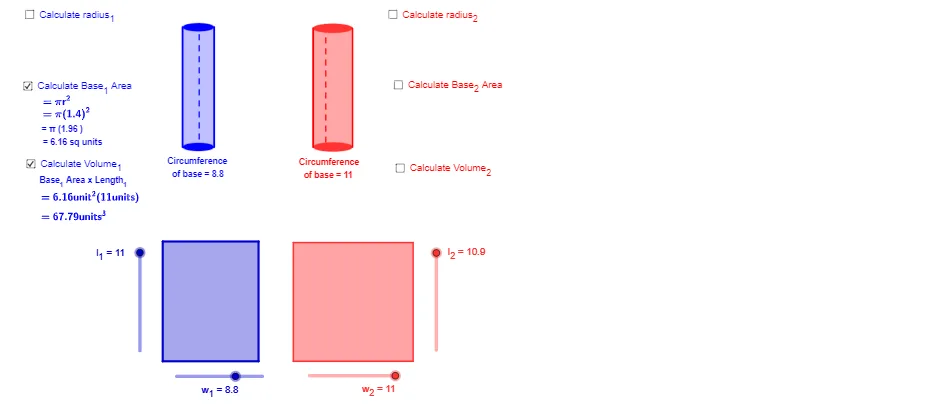
① This example shows how to construct a cylinder geometrically and visually illustrate its volume calculation. ② Core mathematical concepts include the solid‑geometry formula for cylinder volume, the relationship between base‑circle area, height, and volume, and the interplay between polygons and circles. ③ Construction highlights: the model is built with GeoGebra commands Segment, Polygon, Ellipse, OrthogonalLine, Circle, Intersect, Point, Line, and Midpoint, creating objects such as base circles (r_1, r_2), side rectangles (l_1, w_1, l_2, w_2), vertices (A_1, B_1, C_1, D_1, A_2, B_2, C_2, D_2), polygons (poly1, poly2), and auxiliary points (E, E_1, etc.). ④ Suitable for middle‑school geometry (grades 7‑9) and high‑school solid‑geometry review, and serves as a ready‑to‑use GeoGebra teaching demo.
GeoGebra Commands & Parameters
Segment(A_1, B_1) → aSegment(B_1, C_1) → bSegment(C_1, D_1) → cSegment(D_1, A_1) → dPolygon(A_1, B_1, C_1, D_1) → poly1, a_1, b_1, c_1, d_1Polygon(A_2, B_2, C_2, D_2) → poly2, a_2, b_2, c_2, d_2Ellipse(E, E_1, B) → fSegment(E, E_1) → gOrthogonalLine(E, g) → hCircle(E, l_1) → kIntersect(k, h) → C, DOrthogonalLine(E_1, g) → iCircle(E_1, l_1) → pIntersect(p, i) → F, GSegment(E + ((-0.05), 0), D + ((-0.05), 0)) → jPoint(f) → ISegment(E, E_1) → eLine(I, j) → mCircle(I, l_1) → qIntersect(q, m) → H, JEllipse(D, G_1, J) → rSegment(J, I) → nPolygon(E, E_1, G_1, D) → poly3, e_1, e_2, g_1, d_3Ellipse(R_1, R_2, K) → sSegment(R_1, R_2) → tOrthogonalLine(R_1, t) → f_1OrthogonalLine(R_2, t) → h_1Circle(R_1, l_2) → k_1Circle(R_2, l_2) → p_1Intersect(k_1, f_1) → L, MIntersect(p_1, h_1) → N, OSegment(R_1 + ((-0.055), 0), M + ((-0.055), 0)) → i_1Point(s) → PLine(P, i_1) → m_1Circle(P, l_2) → q_1Intersect(q_1, m_1) → Q, RSegment(P, R) → n_1Ellipse(M, O, R) → s_1Polygon(R_1, R_2, O, M) → poly4, r_3, r_4, o, m_2Midpoint(e) → SSegment(S, E_1) → ra_1Segment(R_1, R_2) → acrossMidpoint(across) → TSegment(T, R_2) → ra_2Segment(E_1 + (0.05, 0), G + (0.05, 0)) → lSegment(R_2 + (0.055, 0), O + (0.055, 0)) → j_1
AI Drawing Prompt Reference
Draw a cylinder to demonstrate its volume calculation. Start by creating two equal circles as bases, then connect the edges of the circles to form the lateral surface. Use the lateral surface and bases to illustrate the volume formula of a cylinder, which is the base area multiplied by the height. Represent the lateral surface and bases as polygons and emphasize geometric relationships using auxiliary lines and perpendiculars.
The prompt above was compiled from the original drawing commands and is for reference only.