
Cylinder Net Demonstration by Math Team - EnergyTech
Loading the math board and drawing, please wait…
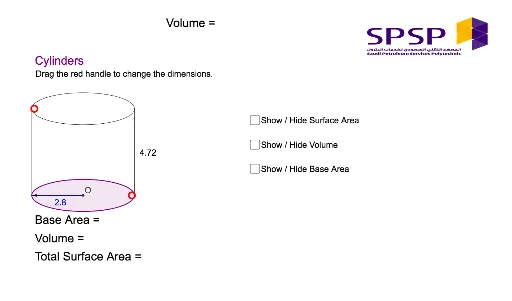
This example demonstrates the net of a cylinder, illustrating key concepts in solid geometry, such as the circumference of a circle and vector operations. It utilizes GeoGebra commands like Line, Point, Ellipse, Vector, Translate, Intersect, Segment, etc., making it suitable for high school students to enhance spatial reasoning skills.
GeoGebra Commands & Parameters
Line(A, B) → aLine(A, C) → bPoint(b) → DEllipse(A, D, E) → cPoint(a) → FVector(A, F) → uTranslate(c, u) → c'Line(F, b) → dIntersect(c', d, 1) → GIntersect(c, b, 1) → HIntersect(c', d, 2) → IIntersect(c, b, 2) → JSegment(H, G) → eSegment(I, J) → fPointIn(c') → Pointc'Intersect(c, e, 1) → KSegment(K, D) → hMidpoint(h) → LPoint(c) → MIntersect(c, e, 1) → PIntersect(c, f, 1) → NSegment(P, N) → iMidpoint(i) → OVector(O, P) → vCircumference(c) → circumferencecPointIn(c) → Pointc_1PointIn(c) → PointcSegment(O, P) → k
AI Drawing Prompt Reference
Draw a cylinder net. First, draw two parallel lines a and b. On line b, take point D. Use A, D, and E to draw ellipse c. On line a, take point F and draw vector u from A to F. Translate ellipse c along vector u to get c'. Draw line d from F to b, and let c' intersect d at G, and c intersect b at H. Let c' intersect d at I, and c intersect b at J. Connect H and G, I and J to get segments e and f. On c', take a point and let it intersect c at K, then connect K and D to get line segment h, with its midpoint as L. On c, take point M and let it intersect e at P and f at N, then connect P and N to get line segment i, with its midpoint as O. Draw vector v from O to P, and draw the circumference of c, with points Pointc and Pointc_1 on the circumference, then connect O and P to get line segment k.
The prompt above was compiled from the original drawing commands and is for reference only.