
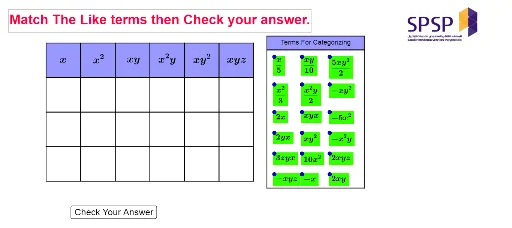
Matching Like Terms
Loading the math board and drawing, please wait…
This example demonstrates how to match like terms using GeoGebra, involving geometric constructions and property analysis. Key math concepts include geometric construction, conditional probability, and geometric mean. Construction highlights from the summary include commands like Intersect, Point, Polygon, Midpoint, Line, and OrthogonalLine. Suitable for high school mathematics teaching, providing an intuitive demonstration of geometric constructions and probability statistics.
GeoGebra Commands & Parameters
Intersect(xAxis, yAxis) → APoint(xAxis) → BPolygon(A, B, 4) → poly1, f, g, h, i, C, DPolygon(C, B, 4) → poly2, j, k, l, m, E, FPolygon(F, E, 4) → poly3, n, p, q, r, G, HPolygon(H, G, 4) → poly4, s, t, a, b, I, JPolygon(J, I, 4) → poly5, c, d, e, f_1, K, LPolygon(L, K, 4) → poly6, g_1, h_1, i_1, j_1, M, NPolygon(B, A, 4) → poly7, k_1, l_1, m_1, n_1, O, PPolygon(E, B, 4) → poly8, p_1, q_1, r_1, s_1, Q, RPolygon(G, E, 4) → poly9, t_1, a_1, b_1, c_1, S, TPolygon(I, G, 4) → poly10, d_1, e_1, f_2, g_2, U, VPolygon(K, I, 4) → poly11, h_2, i_2, j_2, k_2, W, ZPolygon(M, K, 4) → poly12, l_2, m_2, n_2, p_2, A_1, B_1Polygon(P, O, 4) → poly13, q_2, r_2, s_2, t_2, C_1, D_1Polygon(R, P, 4) → poly14, a_2, b_2, c_2, d_2, E_1, F_1Polygon(T, R, 4) → poly15, e_2, f_3, g_3, h_3, G_1, H_1Polygon(V, T, 4) → poly16, i_3, j_3, k_3, l_3, I_1, J_1Polygon(Z, V, 4) → poly17, m_3, n_3, p_3, q_3, K_1, L_1Polygon(B_1, Z, 4) → poly18, r_3, s_3, t_3, a_3, M_1, N_1Polygon(D_1, C_1, 4) → poly19, b_3, c_3, d_3, e_3, O_1, P_1Polygon(F_1, D_1, 4) → poly20, f_4, g_4, h_4, i_4, Q_1, R_1Polygon(H_1, F_1, 4) → poly21, j_4, k_4, l_4, m_4, S_1, T_1Polygon(J_1, H_1, 4) → poly22, n_4, p_4, q_4, r_4, U_1, V_1Polygon(L_1, J_1, 4) → poly23, s_4, t_4, a_4, b_4, W_1, Z_1Polygon(N_1, L_1, 4) → poly24, c_4, d_4, e_4, f_5, A_2, B_2Midpoint(D, B) → C_2Midpoint(C, E) → D_2Midpoint(F, G) → E_2Midpoint(H, I) → F_2Midpoint(J, K) → G_2Midpoint(L, M) → H_2Midpoint(N, M) → I_2Line(B_5, A_5) → g_5Point(g_5) → J_2Point(g_5) → M_2Line(B_2, Z_1) → i_5OrthogonalLine(J_2, g_5) → j_5OrthogonalLine(M_2, g_5) → k_5Line(K_2, O_2) → h_5Intersect(j_5, h_5) → P_2Intersect(k_5, h_5) → Q_2Polygon(P_2, Q_2, M_2, J_2) → poly25, p_5, q_5, m_5, j_6Polygon(J_2, L_2, N_2, M_2) → poly26, j_7, l_5, n_5, m_6Midpoint(A, P) → L_3Midpoint(A, L_3) → M_3Midpoint(O, D_1) → N_3Midpoint(O, N_3) → O_3Midpoint(C_1, P_1) → P_3Midpoint(C_1, P_3) → Q_3Midpoint(B, R) → R_3Midpoint(B, R_3) → S_3Midpoint(P, F_1) → T_3Midpoint(P, T_3) → U_3Midpoint(D_1, R_1) → V_3Midpoint(D_1, V_3) → W_3Midpoint(E, T) → Z_3Midpoint(E, Z_3) → A_4Midpoint(G, V) → B_4Midpoint(G, B_4) → C_4Midpoint(R, H_1) → D_4Midpoint(R, D_4) → E_4Midpoint(F_1, T_1) → F_4Midpoint(F_1, F_4) → G_4Midpoint(H_1, V_1) → H_4Midpoint(H_1, H_4) → I_4Midpoint(T, J_1) → J_4Midpoint(T, J_4) → K_4Midpoint(I, Z) → L_4Midpoint(I, L_4) → M_4Midpoint(V, L_1) → N_4Midpoint(V, N_4) → O_4Midpoint(J_1, Z_1) → P_4Midpoint(J_1, P_4) → Q_4Midpoint(K, B_1) → R_4Midpoint(K, R_4) → S_4Midpoint(Z, N_1) → T_4Midpoint(Z, T_4) → U_4Midpoint(L_1, B_2) → V_4Midpoint(L_1, V_4) → W_4
AI Drawing Prompt Reference
Draw a complex geometric figure composed of multiple quadrilaterals. Start by finding the intersection point A on the axes, then draw a series of quadrilaterals with vertices determined by the Midpoint command. Finally, use the Intersect command to find the intersection of two lines, forming new quadrilaterals.
The prompt above was compiled from the original drawing commands and is for reference only.