
Combine Like Terms Interactive Practice
Loading the math board and drawing, please wait…
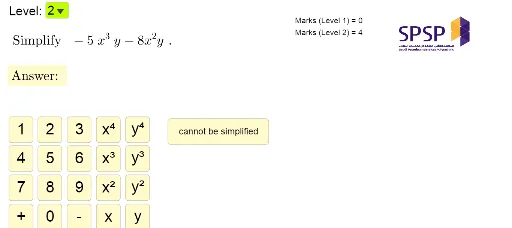
This GeoGebra example demonstrates an interactive algebraic exercise where users practice combining like terms. The program randomly generates mathematical expressions containing like terms, and users must identify and combine them by selecting appropriate operations. Key mathematical concepts include identifying like terms, applying the distributive property, and simplifying algebraic expressions. Construction details: Random and RandomElement commands generate problems of varying difficulty, If commands provide instant answer verification, and Expand command checks the correctness of combined results. The interface includes multiple interactive buttons (input fields, check button, next button, clear button) with visual feedback (checkmark/X icons). Ideal for middle school students learning polynomial operations or teachers demonstrating combining like terms in class.
GeoGebra Commands & Parameters
Random(1, 4) → mJoin({{m, m, m, m, m, m, m, m, m}, {1, 2, 3, 4} \ {m}}) → list2RandomElement(list1) → aRandomElement(list1) → bSelectedIndex(levelList) → levelExpand(input) → input2RandomElement(list2) → nRandomElement({true, false}) → randomXYExpand(If[randomXY, f_1(x) + f_2(x), g_1(x, y) + g_2(x, y)]) → ansL1Random(1, 4) → rExpand(If[randomXY, h_1(x, y) + h_2(x, y), k_1(x, y) + k_2(x, y)]) → ansL2If(level ≟ 1, ansL1, ansL2) → ansIf(level ≟ 1, If[randomXY, textQ1a, textQ1b], If[randomXY, textQ2a, textQ2b]) → textQ
AI Drawing Prompt Reference
Create an interactive combine-like-terms practice screen showing a randomly generated algebraic expression with like terms at the top, several input boxes below for the user to enter each simplification step, and three buttons on the right labeled Check, Next, and Clear; after checking, a checkmark or cross icon appears for instant feedback, and the app supports two difficulty levels with random variable selections.
The prompt above was compiled from the original drawing commands and is for reference only.