
Curvy Slide: Equilateral Triangle Cross Sections
Loading the math board and drawing, please wait…
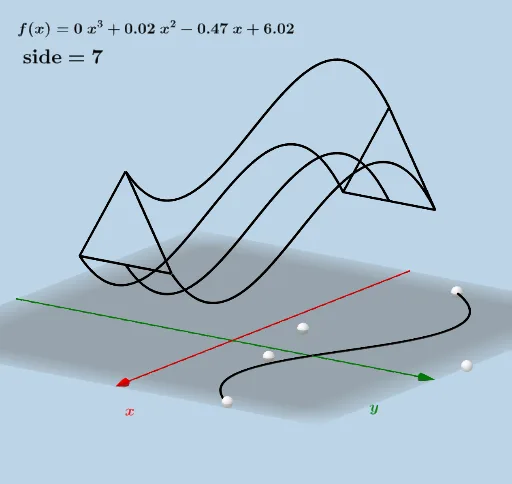
This example demonstrates the dynamic geometric phenomenon of equilateral triangle cross-sections sliding along curves parallel to the y-axis. Core math concepts include equilateral triangles, coordinate geometry, function fitting, rotation, and reflection transformations. Construction highlights GeoGebra commands like PointIn, FitPoly, Rotate, Point, Plane, Segment, Surface, CurveCartesian, Mirror, and Polygon. Suitable for high school and above, it visually illustrates the relationship between 3D geometry and functions.
GeoGebra Commands & Parameters
PointIn(y > 0) → APointIn(y > 0) → BPointIn(y > 0) → CPointIn(y > 0) → DPointIn(y > 0) → EFitPoly({A, B, C, D, E}, n) → fRotate(If[Min[l1] ≤ x ≤ Max[l1], f(x)], π / 2, xAxis) → h_1Point(h_1) → FRotate(G, π / 2, xAxis) → G'Plane(G, G + (0, 1, 0), G + (0, 0, 1)) → pSegment(G', H) → gSurface(u, (-ra) + ((2 * ra) * v), f(u), u, Min[l1], Max[l1], v, 0, 1) → dCurveCartesian(u, 0, f(u) + (sqrt(3) * ra), u, Min[l1], Max[l1]) → eSurface(u, (-ra) + (ra * v), f(u) + ((sqrt(3) * ra) * v), u, Min[l1], Max[l1], v, 0, 1) → iSurface(u, (ra * v), (((-sqrt(3)) * ra) * v) + f(u) + (sqrt(3) * ra), u, Min[l1], Max[l1], v, 0, 1) → jMirror(H, G') → H'Segment(H, H') → kRotate(H, If[0 < MoveMeFirst ≤ 1, (MoveMeFirst * π / 3), π / 3], H', Plane[I, H', H]) → H'_1Rotate(H', If[0 < MoveMeFirst ≤ 1, (MoveMeFirst * π / 3), π / 3], H', Plane[I, H', H]) → H''Segment(H'_1, H'') → k'Rotate(H', If[1 < MoveMeFirst ≤ 2, ((-(MoveMeFirst - 1)) * π / 3), ((-π)) / 3], H, Plane[I, H', H]) → H''_1Segment(H''_1, H) → lPolygon(H, H', Rotate[H, ((-π)) / 3, H', Plane[H, H', I]]) → t1, m, h_2, h'CurveCartesian(u, ra, f(u), u, Min[l1], Max[l1]) → bCurveCartesian(u, (-ra), f(u), u, Min[l1], Max[l1]) → cSegment(M, J) → qSegment(J, N) → rSegment(N, M) → sSegment(K, O) → tSegment(O, L) → aSegment(L, K) → f_1
AI Drawing Prompt Reference
Draw a dynamic geometric figure showing equilateral triangle cross-sections sliding along curves parallel to the y-axis. Start by placing five points on a curve, fit them to create a function, then rotate this function 90 degrees around the x-axis to get a new curve. Based on this rotated curve, construct multiple surfaces and curves to simulate the sliding effect of equilateral triangle cross-sections. The final image should include several 3D surfaces and curves, visually demonstrating the relationship between functions and 3D geometry.
The prompt above was compiled from the original drawing commands and is for reference only.