
Curl Detector: Exploring Vector Fields
Loading the math board and drawing, please wait…
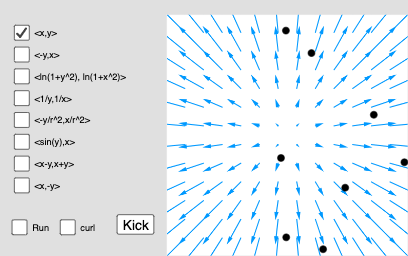
This example demonstrates how to detect curl in vector fields using geometric constructions. Key mathematical concepts include vector fields, curl, and calculus principles. Construction involves GeoGebra commands such as Element, Polygon, Sequence, Setup, LFx, LFy, etc. Suitable for high school students or college freshmen learning calculus and geometric constructions.
GeoGebra Commands & Parameters
Element(LFx, ind) → F1Element(LFy, ind) → F2Polygon((-4, -4), (4, -4), (4, 4), (-4, 4)) → back, f, g, h, iElement(Ltxt, ind) → curlTextElement(curlList1, ind) → curlValue1Element(curlList2, ind) → curlValue2Element(curlList3, ind) → curlValue3Element(curlList4, ind) → curlValue4Element(curlList5, ind) → curlValue5Element(curlList6, ind) → curlValue6Element(curlList7, ind) → curlValue7Element(curlList8, ind) → curlValue8Sequence(Segment[Rotate[P1 - (0.4, 0), j + curlAngle1, P1], Rotate[P1 + (0.4, 0), j + curlAngle1, P1]], j, 0, 2.0944, 1.0472) → spoke1Sequence(Segment[Rotate[P2 - (0.4, 0), j + curlAngle2, P2], Rotate[P2 + (0.4, 0), j + curlAngle2, P2]], j, 0, 2.0944, 1.0472) → spoke2Sequence(Segment[Rotate[P3 - (0.4, 0), j + curlAngle3, P3], Rotate[P3 + (0.4, 0), j + curlAngle3, P3]], j, 0, 2.0944, 1.0472) → spoke3Sequence(Segment[Rotate[P4 - (0.4, 0), j + curlAngle4, P4], Rotate[P4 + (0.4, 0), j + curlAngle4, P4]], j, 0, 2.0944, 1.0472) → spoke4Sequence(Segment[Rotate[P5 - (0.4, 0), j + curlAngle5, P5], Rotate[P5 + (0.4, 0), j + curlAngle5, P5]], j, 0, 2.0944, 1.0472) → spoke5Sequence(Segment[Rotate[P6 - (0.4, 0), j + curlAngle6, P6], Rotate[P6 + (0.4, 0), j + curlAngle6, P6]], j, 0, 2.0944, 1.0472) → spoke6Sequence(Segment[Rotate[P7 - (0.4, 0), j + curlAngle7, P7], Rotate[P7 + (0.4, 0), j + curlAngle7, P7]], j, 0, 2.0944, 1.0472) → spoke7Sequence(Segment[Rotate[P8 - (0.4, 0), j + curlAngle8, P8], Rotate[P8 + (0.4, 0), j + curlAngle8, P8]], j, 0, 2.0944, 1.0472) → spoke8
AI Drawing Prompt Reference
Draw a vector field within a square boundary, with arrows indicating direction and magnitude. Visualize the curl using colored line segments that rotate based on curl calculations. Start by sketching the square, then plot the vector field, and finally add the rotating line segments to represent curl values at different points inside the square.
The prompt above was compiled from the original drawing commands and is for reference only.