
Cube Levels: Exploring 3D Geometry with Complex Numbers and Integer Exponents
Loading the math board and drawing, please wait…
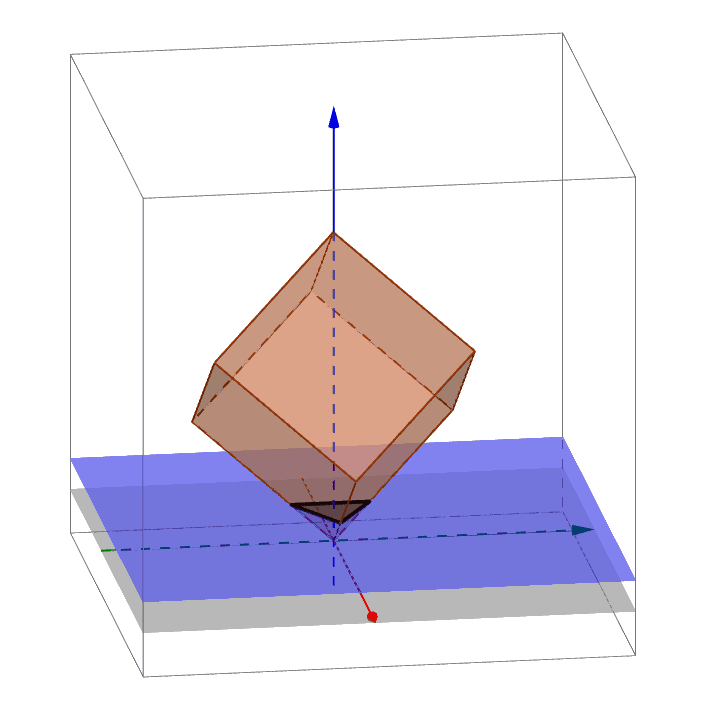
This GeoGebra example demonstrates a multi-level cube structure in 3D space, visualizing the faces, edges, and vertices of cubes and their spatial relationships. The core mathematical concepts include solid geometry properties of cubes, complex number representation, integer exponent operations, and calculations of perimeter and side lengths. The construction uses GeoGebra's Cube command to generate cubes directly, Intersect and IntersectPath commands to compute intersections between faces and paths, and Point commands to mark key vertices (A, B, C, etc.). The object list includes six faces (faceABCD, faceADHE, etc.) and twelve edges (edgeAD, edgeAB, etc.), along with auxiliary points I, J, K for level divisions. This example is suitable for upper secondary or early university students to understand 3D geometric construction, the application of complex numbers in coordinate transformations, and to observe parameter changes across different cube levels through interactive manipulation.
GeoGebra Commands & Parameters
Intersect(yAxis, xAxis) → APoint(Circle[B, Distance[A, B], Segment[A, B]]) → CCube(A, B, C) → a, D, faceCDHG, faceEFGH, edgeAD, edgeAB, edgeBC, edgeCD, edgeAE, edgeDH, edgeEH, edgeEF, E, edgeBF, edgeFG, edgeCG, edgeGH, F, G, H, faceABCD, faceADHE, faceABFE, faceBCGFIntersectPath(d, a) → poly1, I, h, i, j, J, K, L, M, N, e, f, g